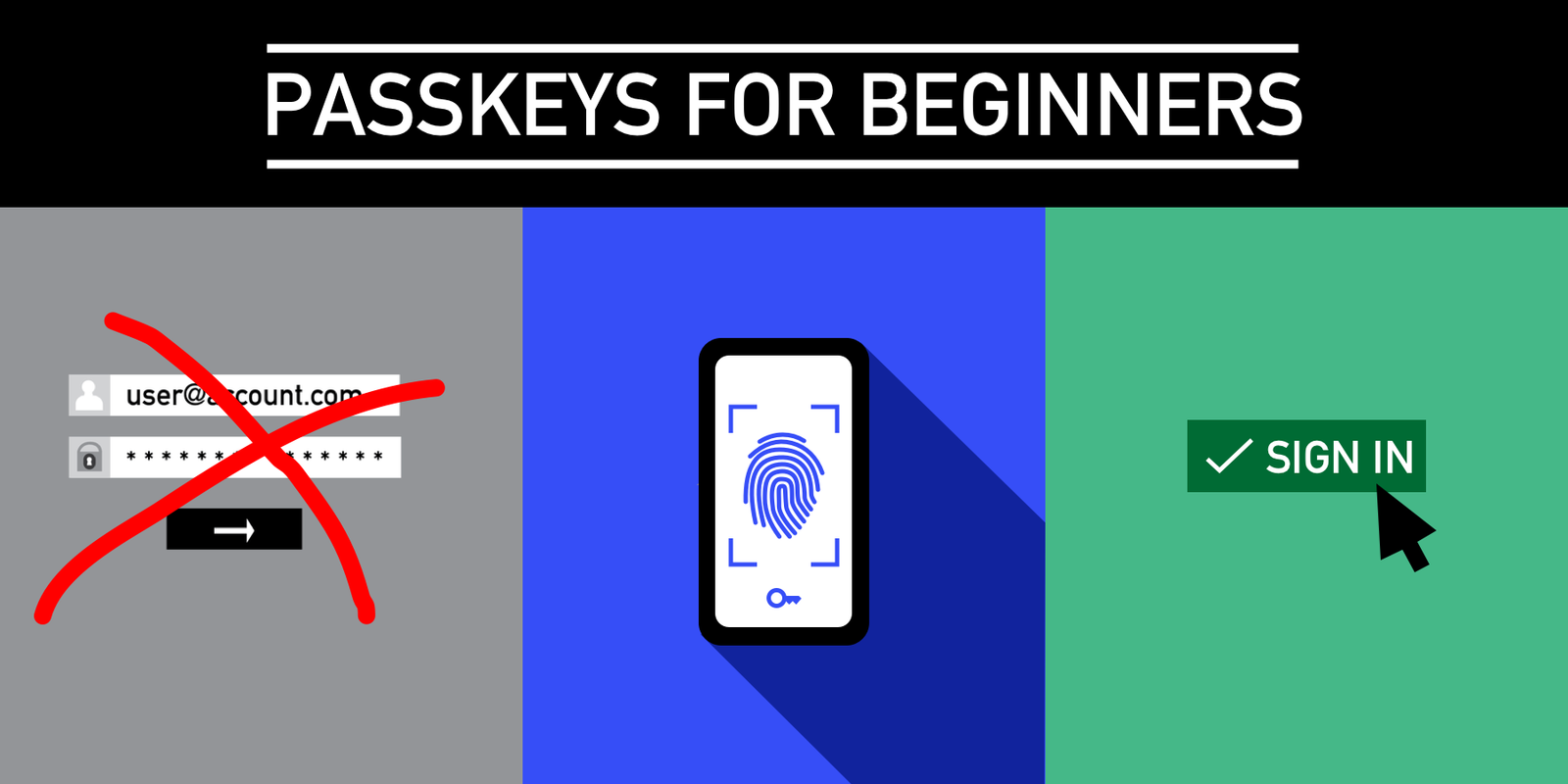
Passwordless Logins: Welcome to the Passkey Revolution
Remember fumbling with forgotten passwords? That dreaded “Incorrect Password” message? Yeah, me too. It’s like a digital rite of passage we could all do without. But what if I told you we’re on the cusp of ditching that whole mess? Enter passkeys. They’re not just some futuristic tech jargon; they’re actively changing how we log into everything online, promising a future that’s way simpler and, frankly, more secure. Forget typing out your cat’s name backwards plus your birth year. This is the new wave.

Source : freedom.press
So, What Exactly IS a Passkey?
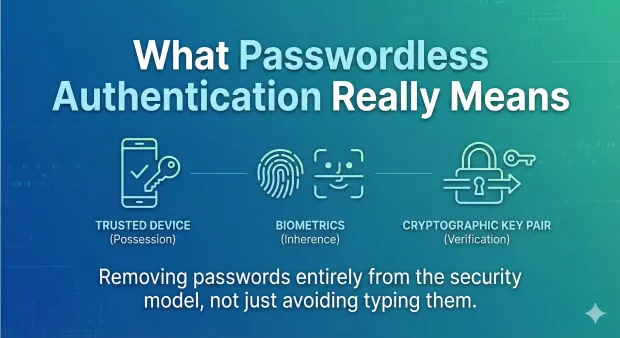
Think of a passkey like a digital key, but way smarter and way more secure than any physical key you’ve ever owned. It’s a cryptographic credential – fancy talk for a super-secret digital handshake – that’s unique to the website or app you’re using. When you create one, it’s stored securely on your device, like your phone or laptop. Unlike passwords, which are sent across the internet (yikes!), passkeys stay put. They use public-key cryptography, which sounds complicated, but basically means you have a pair of keys: one private (on your device, secret sauce) and one public (on the server, no biggie). When you log in, your device uses its private key to prove it’s you, and the server checks with its public key. No password ever leaves your device. Ever. It’s like having a bouncer with a secret handshake instead of a list of names everyone can peek at.
Why We’re Ditching Passwords (Finally!)
Let’s be real: passwords are the worst. They’re hard to remember, a pain to type, and a huge security risk. We reuse them, we write them down on sticky notes (don’t lie), and hackers love them. Data breaches? They often happen because password databases get compromised. It’s a mess. Passwords are also prime targets for phishing scams. Someone tricks you into typing your password on a fake site, and boom, they’re in. Passkeys flip this script entirely. Since there’s no password to steal or phish, those attack vectors just… disappear. It’s a huge security upgrade, making your online life feel a lot safer. Plus, no more password reset emails!
Source : loginradius.com
How Passkeys Actually Work in the Real World
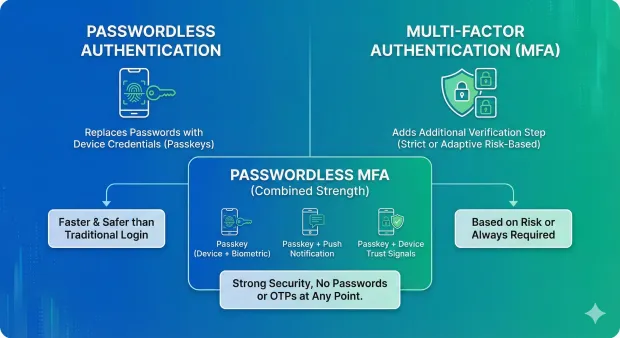
Okay, let’s get practical. Imagine you’re signing up for a new service. Instead of creating a password, you’ll see an option like “Sign up with a passkey.” You tap that, and your phone or computer will likely ask you to verify it’s really you – usually with your fingerprint, face scan, or device PIN. That’s it. You’re in. When you return later, you just tap “Log in with a passkey,” do the same biometric check, and you’re instantly logged in. No typing. No thinking. If you’re using multiple devices, good news! Passkeys can sync across your devices through your cloud accounts (like iCloud Keychain or Google Password Manager). So, if you set a passkey on your phone, you can use it to log in on your tablet or laptop too, as long as they’re linked. It’s incredibly smooth and user-friendly.
The Tech Behind the Magic (Simplified)
It all boils down to a few key technologies working together. The FIDO Alliance (that’s the Fast IDentity Online group) is the main driver here, along with the World Wide Web Consortium (W3C). They’ve developed standards for this stuff. When you create a passkey, your device generates a unique public-private key pair. The public key gets sent to the service provider (like your email or social media site). The private key? It stays locked down on your device, protected by your device’s security (fingerprint, face, PIN). When you try to log in, the service sends a challenge that only your private key can solve. Your device signs this challenge with the private key, and the signed response is sent back. The service verifies it with the public key it has on file. If it matches, you’re in! It’s faster than typing and far more secure than any password could ever be. This whole process creates strong authentication without any user effort.
Source : loginradius.com
Passkeys vs. Passwords: The Showdown
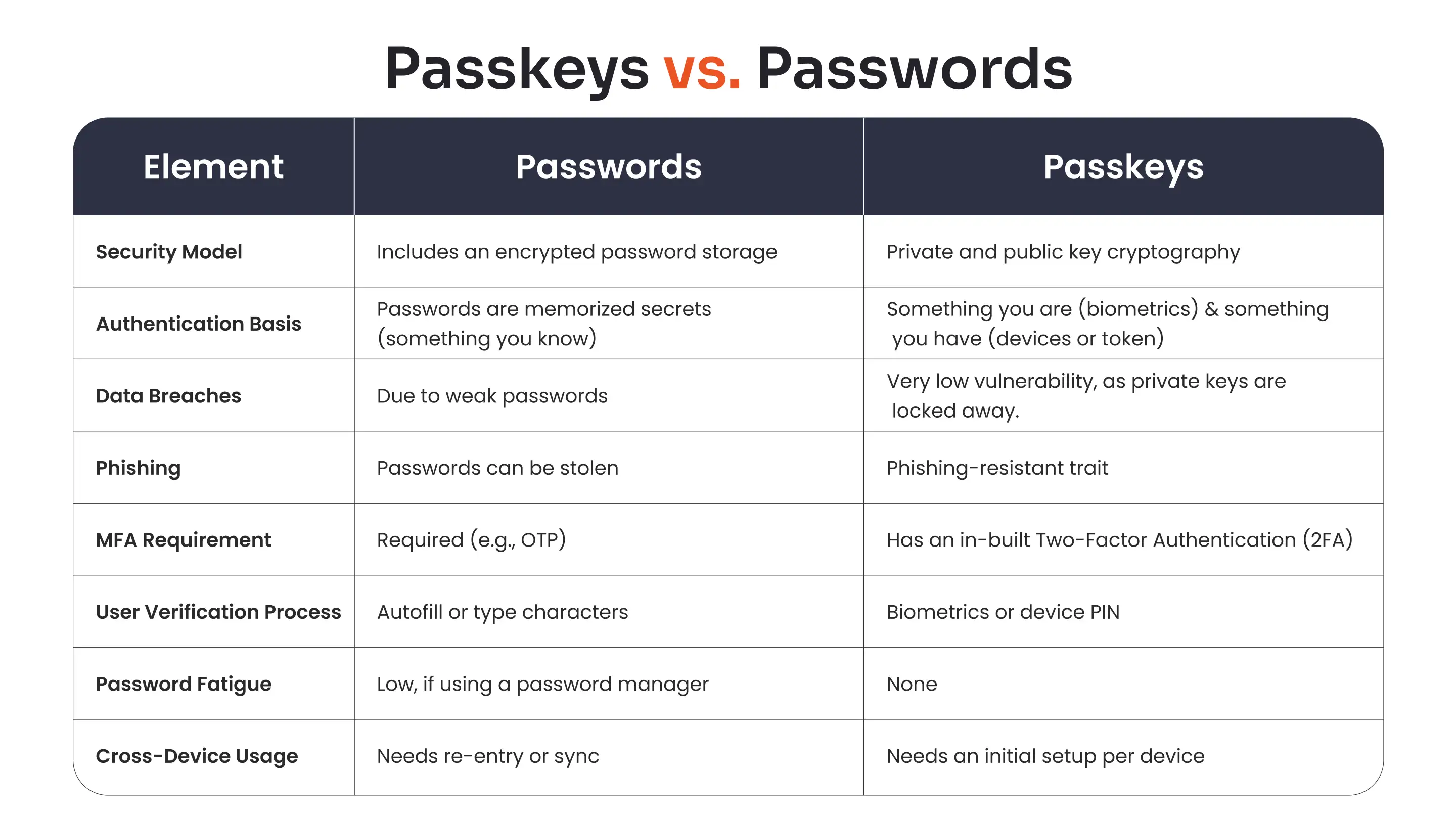
Let’s break it down, because honestly, passwords are so last decade. Passwords are: long, complex strings of characters that you have to remember. Passkeys are: device-bound credentials verified by biometrics or PIN. Passwords are: vulnerable to phishing, keyloggers, and data breaches. Passkeys are: virtually immune to these attacks because no secret is transmitted. Passwords are: a pain to manage, leading to reuse and weak security. Passkeys are: automatically synced (via cloud) and easy to use. Passwords: require frequent complex changes. Passkeys: don’t need changing unless the service itself is compromised (which is rare). Honestly, it’s not even a contest. Passkeys are the clear wier for modern online security.
Who’s On Board With Passkeys? (Spoiler: Everyone)
This isn’t just a pipe dream; major players are diving headfirst into passkeys. Google, Apple, and Microsoft are all deeply invested, making it easier for passkeys to work across their ecosystems. Websites and apps are rapidly adding support. Think social media giants, online retailers, banking apps – they’re all getting on board. You can already use passkeys with Google accounts, Apple IDs, Microsoft accounts, and many popular services like PayPal, eBay, and even some government sites. For a deeper dive into how this impacts payments, check out this guide on payment passkeys. The momentum is huge, and it’s only going to grow. It means a more unified login experience across the web.
Source : miniorange.com
The Roadblocks: What’s Still Tricky?
It’s not all sunshine and rainbows… yet. The biggest hurdle? User adoption and awareness. Many people simply don’t know what passkeys are or why they should use them. Websites and apps need to implement the technology properly, which takes time and resources. Then there’s the issue of syncing passkeys across different platforms if you don’t use the same ecosystem (e.g., switching from an iPhone to an Android phone). While cloud sync helps immensely, ensuring a truly seamless cross-platform experience is still a work in progress for some. Also, what happens if you lose your device? Thankfully, your passkeys are generally recoverable through your cloud account, but it’s a valid concern that needs clear communication. Right now, it’s not 100% password replacement everywhere, but it’s getting there fast.
Setting Up Your First Passkey: It’s Easy!
Ready to ditch passwords? Great! Here’s the gist: When you’re on a website or app that supports passkeys, look for the option to “Create a passkey” or “Sign in with a passkey.” Follow the prompts. It usually involves confirming your identity using your device’s screen lock – your fingerprint, face scan, or PIN. Your device will then securely store this passkey. That’s literally it. For example, if you’re on Chrome on Android or Safari on iOS, you’ll likely see prompts that integrate directly with your Google or Apple account for syncing. It’s about making the login process ridiculously simple.
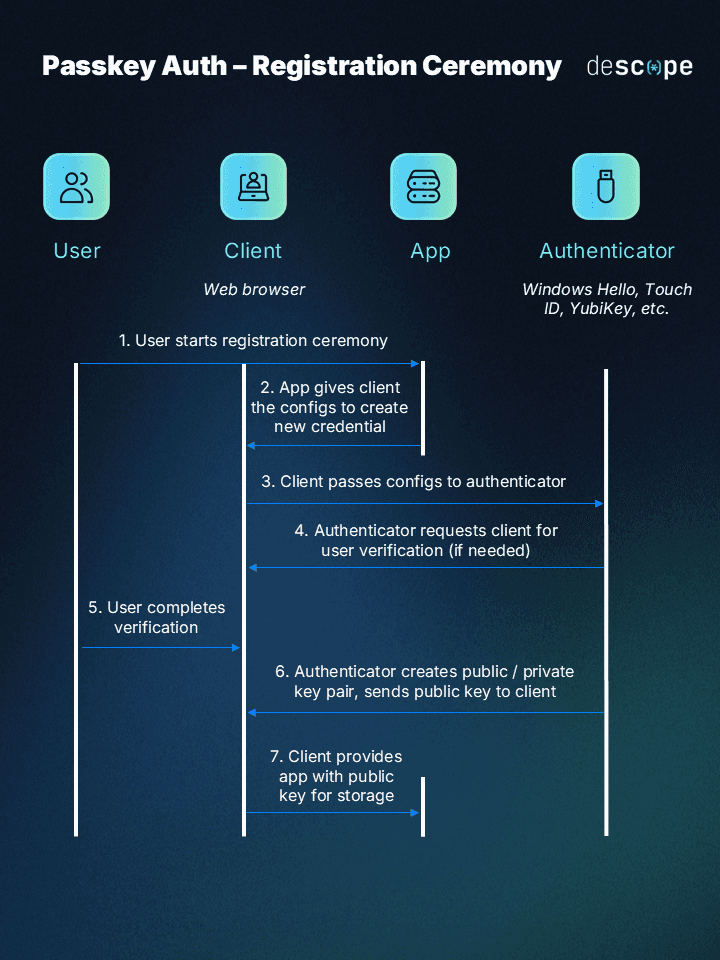
Source : descope.com
The Future is Passwordless
We’re moving beyond the era of remembering dozens of complex, easily forgotten, and insecure passwords. Passkeys represent a massive leap forward in online security and convenience. They offer a robust, user-friendly alternative that tackles the fundamental flaws of traditional password systems. While there are still bumps in the road, the industry is clearly heading towards a passwordless future. So, embrace the change. Start using passkeys where you can. Your future, less-frustrated self will thank you. It’s time to say goodbye to password overload for good.
Frequently Asked Questions About Passkeys
What happens if I lose my phone? Can I still log in?
Totally understandable worry! If you lose your phone, you can still access your accounts. Your passkeys are typically synced to your cloud account (like iCloud Keychain or Google Password Manager). So, when you get a new phone and sign into your account, your passkeys should sync back down. You might need to use a backup method temporarily, but you won’t be locked out forever. It’s designed to be a recovery option.
Are passkeys really more secure than passwords?
Yep, pretty much. Passwords can be phished, stolen in data breaches, or guessed. Passkeys use cryptography that’s way harder to crack. Since the secret key never leaves your device and isn’t transmitted over the internet, it dodges most common online attacks. They’re considered a significant security boost.
Do I have to give up all my passwords immediately?
Nah, not necessarily. Most services are letting users transition gradually. You can start using passkeys for new accounts or for services that offer them, while keeping passwords for older ones that don’t support passkeys yet. It’s a phased migration, not an overnight switch. You’ll get there.
Can I use passkeys on all my devices?
Mostly yes! If your devices are linked to the same cloud account (like your Apple ID across Apple devices, or your Google account across Android/Chrome), your passkeys should sync. So, a passkey created on your phone can be used on your laptop. It’s about cross-device convenience, though sometimes platform differences can add a small hiccup.
Are passkeys free to use?
Absolutely! Creating and using passkeys themselves doesn’t cost you anything. The technology is built into your operating systems and browsers. Any fees you might associate with them are usually tied to the underlying cloud syncing services, which many of us already use. So, using passkeys is free.