The Best Invoicing Tools for Global Clients: Ditch the Hassle, Get Paid Faster
Let’s cut to the chase. Dealing with international clients can be a headache, right? Different currencies, time zones, and let’s not even start on the payment methods. It’s enough to make you want to stick to local gigs. But if you’re serious about growing your business, you gotta go global. And to do that without pulling your hair out, you need the right tools. Specifically, you need invoicing software that plays nice with clients all over the world. Forget those clunky systems that only speak your local language. We’re talking about getting paid on time, every time, no matter where your client is chilling.

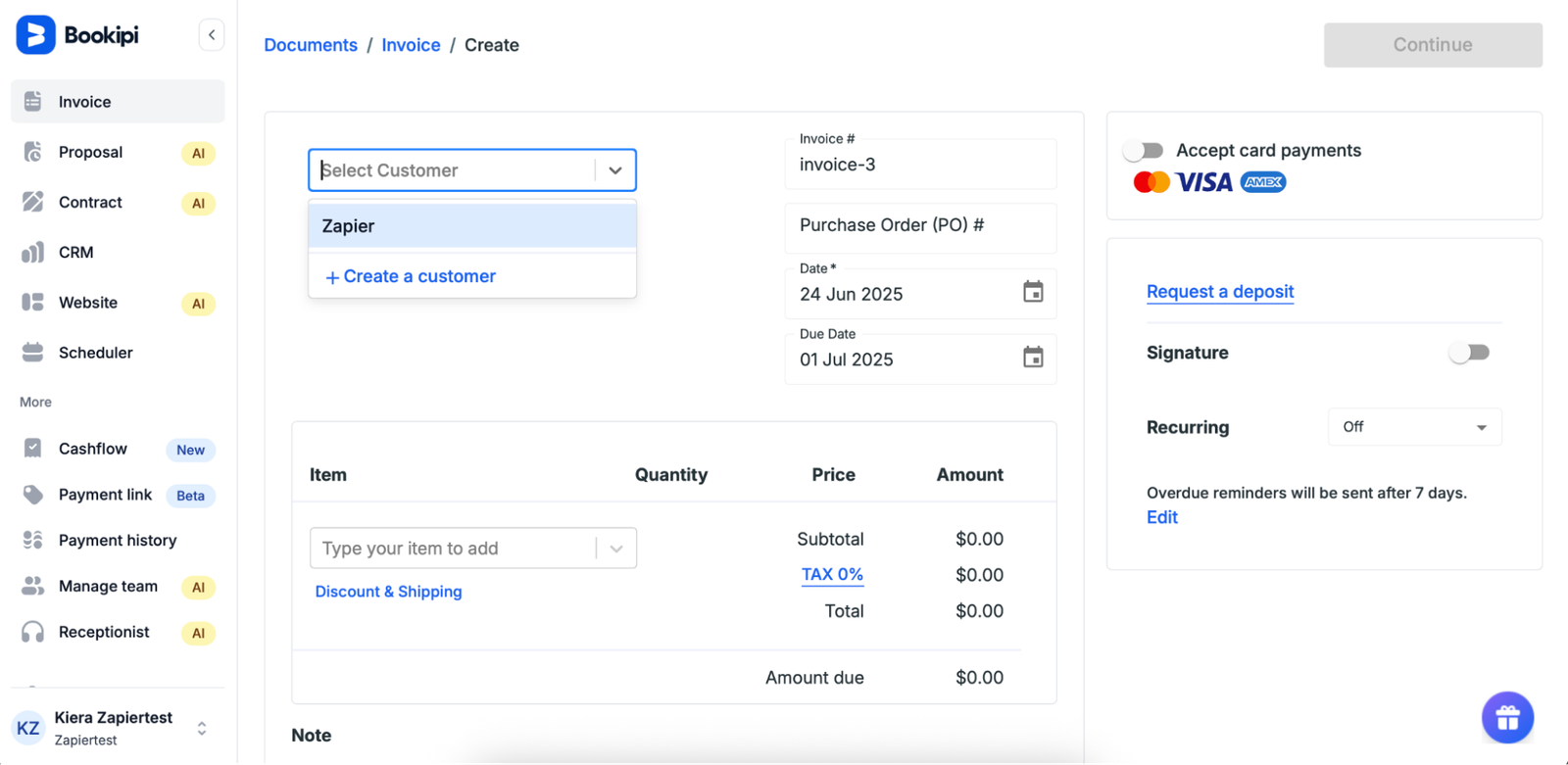
Source : zapier.com
Why Your Business Needs Global-Ready Invoicing
Seriously, why even bother with international clients? Because they often have bigger budgets and can open up entirely new markets for your services or products. Think about it: you’re not limited by geography anymore. That freelance gig you landed in London? Or that product sale to a company in Singapore? Big wins. But here’s the catch: if your invoicing process is a mess, you’re going to lose money and goodwill. Imagine sending an invoice that your client can’t even open, or worse, one that comes with a ridiculous currency conversion fee they weren’t expecting. That’s a quick way to get your invoice ignored and your payment delayed. Good invoicing tools for global clients make this whole process smooth sailing.
Key Features to Look For
So, what separates a decent invoicing tool from one that’ll actually help you conquer the world market? It’s not just about sending a PDF. You need features that address the specific pain points of international transactions. First off, multi-currency support is non-negotiable. Your clients should see the invoice in their local currency, and you should be able to receive payments in yours (or a stable one like USD). Automatic currency conversion rates are a lifesaver here. Then there’s international payment gateways. Think Stripe, PayPal, Wise (formerly TransferWise) – the big players that make cross-border payments less painful. You also want multi-language support. A client will appreciate getting an invoice in their native tongue, trust me. And don’t forget tax compliance. Dealing with VAT, GST, or other international taxes is a nightmare. The best tools help you navigate this minefield, or at least provide the data you need to hand over to your accountant.
The Top Contenders: Tools That Actually Work Globally
Alright, enough theory. Let’s dive into the actual software that can make your global invoicing life easier. We’ve sifted through the noise to find the ones that tick the most boxes for international business.
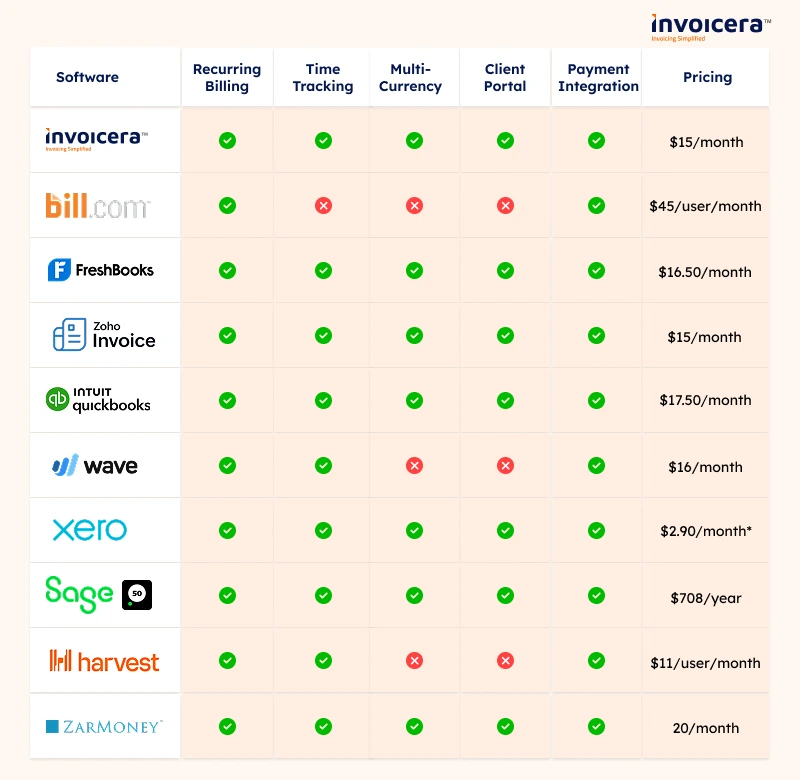
Source : invoicera.com
FreshBooks: The Freelancer’s Friend with Global Reach
FreshBooks has long been a darling of the freelance and small business world, and for good reason. It’s incredibly user-friendly, which is a huge plus when you’re already juggling a million things. For international clients, it shines with its multi-currency invoicing. You can set up invoices in pretty much any currency, and clients can pay you via credit card or bank transfer through integrations with popular gateways like Stripe and PayPal. They handle the currency conversion on the backend, making it pretty seamless for both parties. Plus, their expense tracking and time-tracking features mean you can build a truly comprehensive invoice for your services. It’s a solid all-rounder that makes global transactions feel less intimidating. Honestly, if you’re just starting to dip your toes into international waters, FreshBooks is a great choice.
Zoho Invoice: Feature-Rich and Surprisingly Free
Now, let’s talk about value. Zoho Invoice is a powerhouse, and here’s the kicker: it’s free for businesses with up to 10 users and 1,000 clients aually. Yeah, you read that right. For international invoicing, it offers multi-currency support, multiple payment gateway integrations (Stripe, PayPal, Authorize.net, and more), and client portals where your customers can view and download their invoices. You can even send automated payment reminders, which is gold when you’re dealing with clients across different time zones. They also offer customizable templates in multiple languages. It might not have all the bells and whistles of some of the pricier options, but for the price (or lack thereof), it’s incredibly capable for global clients. It’s one of the best free invoicing solutions out there, period.
QuickBooks Online: For the Growing Business
If you’re ruing a slightly larger operation, or you anticipate some serious growth, QuickBooks Online is a name you’ll hear a lot. It’s a full-fledged accounting system, not just an invoicing tool. For global invoicing, it supports multiple currencies and has integrations with platforms like PayPal and Stripe for international payments. You can also add sales tax rates for different countries, which is crucial. The reporting features are robust, giving you deep insights into your income and expenses, even from international sales. It can feel a bit overwhelming at first with all its features, but if you need a comprehensive accounting solution that handles international invoicing like a pro, QuickBooks Online is worth a serious look. They offer a whole suite of tools for managing revenue, which is pretty impressive. billing software solutions from companies like Salesforce are also worth checking out for larger enterprises.
Xero: The Cloud Accounting Champ
Xero is another major player in the cloud accounting space, often seen as a direct competitor to QuickBooks. It offers solid multi-currency capabilities, allowing you to deal with transactions in various currencies and automatically update exchange rates. You can coect it to payment gateways like Stripe and GoCardless for easier international payments. Xero’s strength lies in its clean interface and extensive app marketplace, meaning you can integrate it with other tools you use for marketing, CRM, or project management. For global businesses, this intercoectedness is key. It helps streamline your entire workflow, from initial quote to final payment. If you want a powerful accounting system that handles international invoicing well, Xero is a strong contender.
Wave: The Free Option with Basic Global Support
Wave is known for its free accounting and invoicing software, which is a huge draw for solopreneurs and very small businesses. For international clients, Wave supports multiple currencies, meaning you can send an invoice in EUR even if your primary currency is USD. They also integrate with Stripe for credit card payments, which works globally. However, it’s important to note that Wave’s currency conversion might not be as sophisticated as some of the paid alternatives. Also, direct bank transfers might be more limited depending on the client’s country. It’s a great starting point if your international client base is small and concentrated in a few key regions, offering free invoicing capabilities that are hard to beat. But for widespread global operations, you might outgrow it.
Stripe: Beyond Just Payments, It’s Invoicing Too
Source : helcim.com
Most people know Stripe as a payment processor, but they also have a solid invoicing product. Stripe Invoicing is particularly strong if your clients are already comfortable paying via Stripe. It allows you to create and send invoices in multiple currencies and supports a wide range of payment methods globally. You can automate reminders and even set up recurring invoices for subscription-based businesses. The beauty of using Stripe for invoicing is its seamless integration with its own powerful payment processing capabilities. This means fewer third-party integrations and a more unified experience. If you’re looking for a solution where payments and invoicing are tightly coupled, especially for international transactions, Stripe is a top choice. Check out guides like best invoicing software for more freelance-focused options.
PayPal: The Familiar Face for Payments
PayPal is practically a household name, and its invoicing feature leverages that familiarity. You can easily create and send invoices in different currencies, and clients can pay using their PayPal accounts or credit cards. It’s incredibly convenient for clients who already use PayPal. The transaction fees can sometimes be a bit higher than other options, especially for international payments, so that’s something to watch out for. But for quick, easy invoicing to a client base that’s likely already familiar with the platform, PayPal invoicing is a straightforward solution. It’s ubiquitous, which is a major plus for global reach.
Wise (formerly TransferWise): For Cost-Effective Transfers
While not a dedicated invoicing platform in the same way as Zoho or FreshBooks, Wise is revolutionary for its low-cost international money transfers. Many businesses use it in conjunction with other invoicing tools. You can generate a Wise account number for different currencies, and give that to your client to pay you directly into. This bypasses many of the hefty fees associated with traditional bank wires or even some payment processors. If your primary concern is minimizing fees on international payments and your clients are comfortable with bank transfers, Wise is a must-have in your financial toolkit. It truly helps cut down on costs.
Making the Right Choice: What’s Best for YOU?
Okay, we’ve covered a lot of ground. So how do you pick the wier? It really boils down to your specific business needs. Are you a solo freelancer just starting out? Zoho Invoice’s free plan or Wave might be perfect. Need something robust with full accounting features for a growing team? QuickBooks Online or Xero are strong contenders. If you want a super user-friendly experience focused on service-based businesses, FreshBooks is hard to beat. And if seamless payment processing is your top priority, Stripe’s invoicing is a natural fit. Don’t just pick the tool with the most features; pick the one that solves your problems. Consider factors like ease of use, pricing, integration capabilities, and crucially, how well it handles payments and currencies for your target client locations. Remember, the goal is to get paid easily and keep your clients happy, no matter where they are. CNBC Select offers insights into best invoicing software for small businesses, which can offer additional perspectives.
FAQs for Global Invoicing
Is Zoho Invoice 100% free?
Zoho Invoice offers a completely free plan that’s pretty generous. It’s free for businesses with up to 10 users and 1,000 clients per year. This free tier includes essential features like multi-currency support, customizable templates, automated reminders, and client portals. So, for many small businesses and freelancers, it can indeed be 100% free to use for their invoicing needs. It’s an amazing deal!
Which is better, Vyapar or myBillBook?
Comparing Vyapar and myBillBook is tricky because they often cater to similar markets, particularly in India. Both offer robust invoicing, inventory management, and accounting features. Vyapar is often praised for its simplicity and ease of use, making it great for small businesses just starting out. myBillBook, on the other hand, sometimes gets the nod for its slightly more advanced features, particularly in inventory tracking and GST compliance. However, neither are typically the first choice for businesses with a primarily international client base. Their focus is heavily domestic. If you’re looking for global reach, you’d likely be better served by tools like Zoho Invoice or FreshBooks. It really depends on your specific local needs.

Source : mooninvoice.com
What are the biggest challenges when invoicing international clients?
Oh man, where do I start? The biggest headaches are definitely currency conversion and payment fees. Nobody wants to lose a chunk of their earnings to exchange rates or hefty international transfer charges. Then you’ve got language barriers – trying to clarify an invoice detail in a language you don’t speak is a special kind of torture. Time zone differences make communication and follow-ups tough too. And let’s not forget differing tax laws and regulations, which can turn a simple invoice into a compliance nightmare. Getting the currency right is key.
How do I handle different tax requirements for international invoices?
This is where things get spicy. For starters, know your own country’s rules about reporting foreign income. Then, research your client’s country’s rules. Does your client owe local sales tax (like VAT or GST)? If so, your invoice needs to reflect that. Some invoicing software helps calculate this automatically, which is a lifesaver. Others might just provide the fields for you to enter it manually. You might also need to include specific tax identification numbers on the invoice. Honestly, for complex international sales, it’s often best to consult with an accountant who specializes in international tax law. They can save you a world of pain and potential penalties.
Can I accept payments in crypto for international clients?
You absolutely can! Accepting cryptocurrency for international payments is becoming more common, especially for businesses dealing with tech-savvy clients or those in regions with less stable traditional banking systems. Many platforms now integrate with crypto payment processors, allowing you to invoice and receive payments in Bitcoin, Ethereum, or other popular coins. The big advantage is potentially lower transaction fees and faster settlement times compared to traditional methods. However, you need to be aware of the volatility of crypto prices and the regulatory landscape, which can vary wildly by country. It’s an option, but requires careful consideration of risks and rewards.
Frequently Asked Questions
-
Is Zoho Invoice 100% free?
Zoho Invoice offers a completely free plan that’s pretty generous. It’s free for businesses with up to 10 users and 1,000 clients per year. This free tier includes essential features like multi-currency support, customizable templates, automated reminders, and client portals. So, for many small businesses and freelancers, it can indeed be 100% free to use for their invoicing needs. It’s an amazing deal!
-
Which is better, Vyapar or myBillBook?
Comparing Vyapar and myBillBook is tricky because they often cater to similar markets, particularly in India. Both offer robust invoicing, inventory management, and accounting features. Vyapar is often praised for its simplicity and ease of use, making it great for small businesses just starting out. myBillBook, on the other hand, sometimes gets the nod for its slightly more advanced features, particularly in inventory tracking and GST compliance. However, neither are typically the first choice for businesses with a primarily international client base. Their focus is heavily domestic. If you’re looking for global reach, you’d likely be better served by tools like Zoho Invoice or FreshBooks. It really depends on your specific local needs.
-
What are the biggest challenges when invoicing international clients?
Oh man, where do I start? The biggest headaches are definitely currency conversion and payment fees. Nobody wants to lose a chunk of their earnings to exchange rates or hefty international transfer charges. Then you’ve got language barriers – trying to clarify an invoice detail in a language you don’t speak is a special kind of torture. Time zone differences make communication and follow-ups tough too. And let’s not forget differing tax laws and regulations, which can turn a simple invoice into a compliance nightmare. Getting the currency right is key.
-
How do I handle different tax requirements for international invoices?
This is where things get spicy. For starters, know your own country’s rules about reporting foreign income. Then, research your client’s country’s rules. Does your client owe local sales tax (like VAT or GST)? If so, your invoice needs to reflect that. Some invoicing software helps calculate this automatically, which is a lifesaver. Others might just provide the fields for you to enter it manually. You might also need to include specific tax identification numbers on the invoice. Honestly, for complex international sales, it’s often best to consult with an accountant who specializes in international tax law. They can save you a world of pain and potential penalties.
-
Can I accept payments in crypto for international clients?
You absolutely can! Accepting cryptocurrency for international payments is becoming more common, especially for businesses dealing with tech-savvy clients or those in regions with less stable traditional banking systems. Many platforms now integrate with crypto payment processors, allowing you to invoice and receive payments in Bitcoin, Ethereum, or other popular coins. The big advantage is potentially lower transaction fees and faster settlement times compared to traditional methods. However, you need to be aware of the volatility of crypto prices and the regulatory landscape, which can vary wildly by country. It’s an option, but requires careful consideration of risks and rewards.