
Future-Proofing Your Personal Cybersecurity
Why Being “Secure Enough” Just Isn’t Cutting It Anymore
Look, we all think we’re safe. Got a password, maybe two-factor authentication. You figure that’s good enough, right? Wrong. The digital world’s a wild west, and the bad guys? They’re not just cowboys anymore. They’re highly organized, super tech-savvy, and they’re coming for you, your data, your money. It’s getting scary out there, and staying ahead means more than just locking your virtual door. You’ve got to future-proof your security.

Source : cloudsecurityguy.substack.com
The Groundskeeper of Your Digital Life
Think of yourself as the groundskeeper of your digital life. It’s not just about cutting the grass and trimming the hedges once in a while. You’ve got to anticipate the pests before they arrive, reinforce the fences before a storm hits, and constantly upgrade your tools because the old ones just don’t cut it anymore. The threats are evolving faster than you can blink. What was cutting-edge security last year is practically ancient history today. We’re talking about AI-powered attacks, sophisticated phishing scams that look exactly like legit emails, and ransomware that can cripple your entire life. It’s a constant battle, and frankly, the stakes are too high to just wing it. We need a plan, a real, robust strategy to keep the digital weeds from taking over.
Don’t Get Left Behind: Key Areas to Fortify Now
So, where do you even start? It feels overwhelming, I get it. Like staring at a mountain of tech jargon. But it doesn’t have to be that way. We can break it down. It’s about understanding the core principles and then applying them consistently. This isn’t about becoming a cybersecurity expert overnight. It’s about smart, practical steps that make a real difference. Forget those generic “tips” you see everywhere. We’re talking about actionable strategies that actually work. Let’s dig into the real meat of it. You’ll be surprised how accessible cybersecurity resilience can be.
Password Hygiene: It’s More Than Just a Strong Password
Alright, let’s tackle the elephant in the room: passwords. Yeah, yeah, you’ve heard it a million times. Make it strong. Don’t reuse it. Blah blah blah. But are you actually doing it? And are you doing it the smart way? Because just picking a random string of characters isn‘t enough anymore. We’re talking about password managers. Seriously, if you’re not using one, you’re practically leaving your front door wide open. Think of it as a digital vault for all your credentials. You create one super-strong master password (that you actually remember), and the manager handles the rest. It generates unique, complex passwords for every single site you use. No more “password123” or your pet’s name. It saves you time, and more importantly, it saves you from countless headaches down the line. It’s a foundational piece of personal data protection.
Multi-Factor Authentication (MFA): Your Digital Bouncer
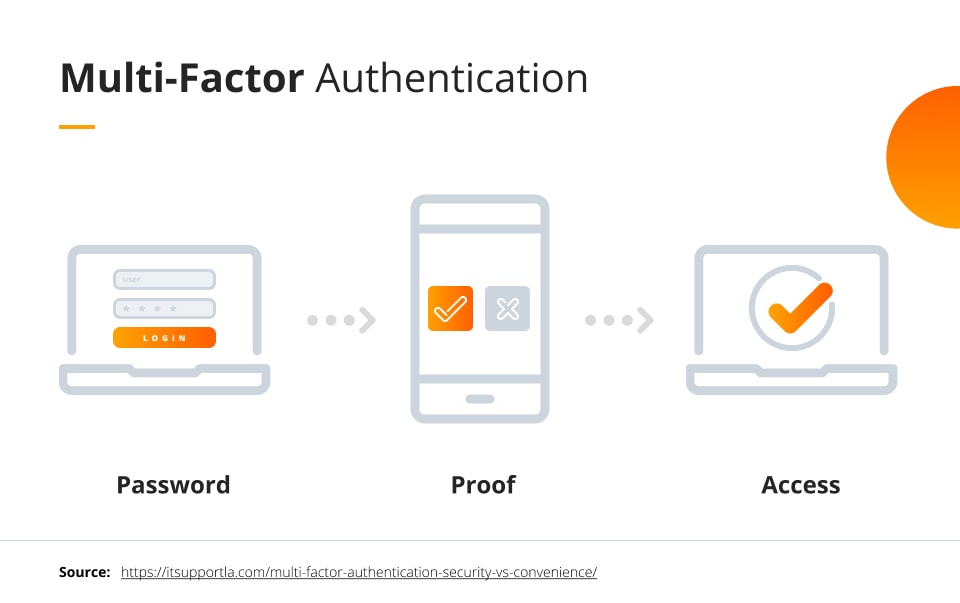
Next up: MFA. Or two-factor authentication (2FA), whatever you call it. This is your digital bouncer. It’s that extra layer of security that makes it ridiculously hard for anyone to get into your accounts, even if they somehow nab your password. We’re talking about more than just a text message code. While better than nothing, those can be intercepted. Think authenticator apps like Google Authenticator or Authy. They generate time-sensitive codes right on your phone. Or even better, hardware security keys – those little USB-like devices that are nearly impossible to phish. The point is, don’t be lazy. Turn on MFA everywhere you can. It’s a non-negotiable step for account security.
Software Updates: The Unsexy But Crucial Chore
Okay, this one’s boring. I know. Software updates. Ugh. That little notification pops up, and your first instinct is to hit “Remind Me Later,” right? Don’t. Seriously, stop doing that. Developers push updates for a reason. Usually, it’s to patch up security holes. The bad guys know these holes exist, and they’re actively scanning for systems that haven’t been patched. Think of it like this: a burglar knows your back window latch is broken. Are you going to leave it open just because fixing it is a pain? No way. Keeping your operating system, your browser, your apps – everything – updated is a fundamental part of cybersecurity hygiene. You can read more about this in future-proofing security guides.
Beware the Phish: Recognizing and Avoiding Scams
Phishing. It’s a classic. And it’s getting so much better. Gone are the days of obviously fake emails with terrible grammar. Now, they’re personalized. They impersonate your bank, your boss, even your friends. They tug at your emotions – fear, urgency, greed. The key? Be skeptical. Always. If an email or message asks you to click a link, download an attachment, or provide personal information, pause. Double-check the sender’s email address (like, really look at it). Does it look slightly off? Is the greeting generic when it should be personal? If you’re unsure, don’t click. Go directly to the website or call the company using a number you know is legitimate. Scam prevention is all about awareness and a healthy dose of paranoia. You might find this paper on future-proofing security offers some great insights.
Passwordless Logins: The Era of Passkeys Explained

Source : freedom.press
The Death of the Password Is Near
Let’s be honest, passwords are a nightmare. We all have dozens, maybe hundreds, and remembering them? Forget it. That’s why password managers became a thing. But now? We’re talking about ditching them entirely. Enter passkeys. Think of them like digital fingerprints, unique to each website or app, stored securely on your device. No more typing, no more weak passwords getting hacked. It’s a whole new ballgame, and frankly, it’s about time.
How Passkeys Actually Work
So, how does this magic happen? When you sign up for something new, you create a passkey. Your device (your phone, your laptop) generates a unique cryptographic pair: a public key (shared with the website) and a private key (kept secret on your device). When you log in, the website sends a challenge, your device uses the private key to solve it, and bam – you’re in. It’s way faster and way more secure than typing out ‘Password123!’ (which, by the way, you should absolutely stop doing). This is the future of secure authentication.
Your Devices are Now Your Keys
This shift means your phone or your computer becomes your primary security token. Sounds risky? Maybe. But here’s the kicker: these passkeys are protected by your device’s existing security – your fingerprint, your face scan, your PIN. If someone swipes your phone, they can’t just log into everything. They’d still need your biometrics or PIN. It’s a huge leap forward, moving us away from those vulnerable text strings into something much more robust. Seriously, if you’re not looking into passkeys, you’re falling behind.
AI’s Role in Bypassing Two-Factor Auth
Source : future-processing.com
The Sneaky Side of AI
Alright, let’s talk about the elephant in the room. While we’re cheering for passkeys, the bad guys are cooking up new ways to mess with us. And guess what? AI is a big part of that. Remember when two-factor authentication (2FA) felt like the ultimate security shield? Like, even if they stole your password, they still needed that code from your phone? Yeah, AI is starting to poke holes in that too.
Phishing 2.0: AI-Powered Attacks
We’re seeing AI-driven phishing campaigns that are terrifyingly convincing. These aren’t your grandma’s spam emails. We’re talking personalized messages, written in flawless grammar, referencing things they couldn’t possibly know (unless they’ve already breached something). They can even generate fake login pages that look identical to the real ones. Your bank’s site? Your email provider? Poof. One wrong click and your 2FA code might just end up in the hands of a bot.
Man-in-the-Middle, Meet Machine Learning
Then there’s the more sophisticated stuff. AI can be used to automate and scale man-in-the-middle attacks. Imagine a bot that can intercept your 2FA request in real-time, get the code from you via a fake prompt, and then use it before it expires. It’s incredibly fast and requires zero human intervention on their end. This is why relying solely on SMS-based 2FA is becoming increasingly dangerous. We need to be thinking about authenticator apps and hardware keys.
Spotting AI Voice-Cloning Scams
Source : keepnetlabs.com
The “My Boss Needs Money” Scam, Evolved
You get a call. It sounds exactly like your CEO, your spouse, your best friend. They sound stressed. They need you to wire money, buy gift cards, or send sensitive information – immediately. This isn’t just impersonation anymore. This is AI voice cloning. It’s scary how accurate it’s getting, and it’s a prime example of how quickly tech can be weaponized.
Red Flags You Can’t Ignore
So, how do you avoid becoming a victim? First, trust your gut. If a request feels off, it probably is. Second, hang up and call the person back on a number you know is theirs. Don’t rely on the caller ID – that can be spoofed too. Listen for odd pauses, unnatural inflections, or if they pressure you to act without thinking. Scammers using AI-generated voices often make mistakes or have slight glitches that can give them away if you’re listening closely.
What to Do If You Suspect a Voice Scam
If you think you’re on the line with a voice-cloning scammer, don’t engage. Just hang up. Then, verify the request through a separate, trusted communication channel. If it was supposed to be your boss, call their office line. If it was a family member, call their personal cell. Never, ever send money or sensitive data based on a single phone call, especially if it came out of the blue and involved a sense of urgency. This is a critical part of personal security training.
Securing Your Crypto Wallets from Modern Threats
Source : phishfort.com
Crypto is Still a Goldmine for Hackers
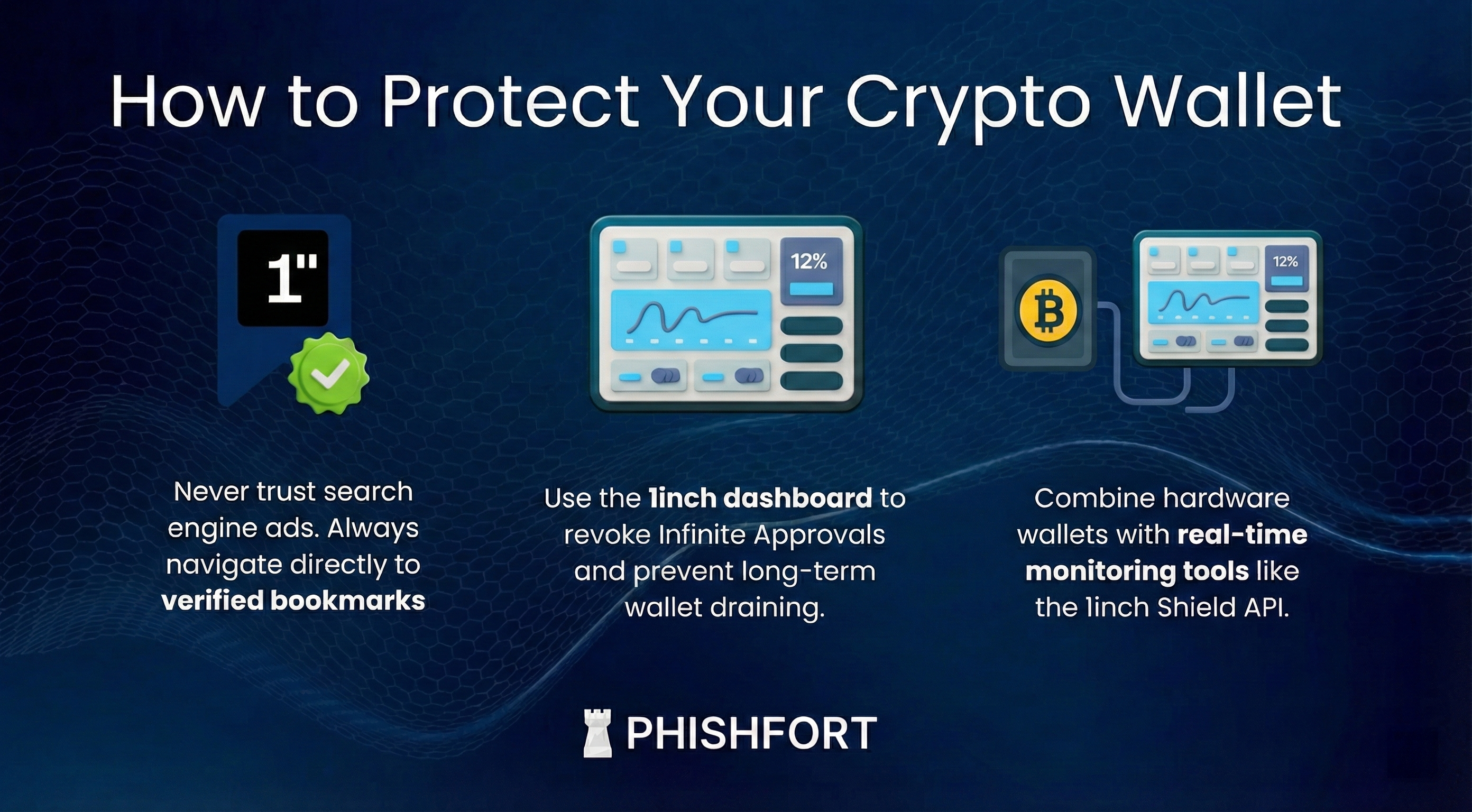
Look, digital currency is here to stay. And where there’s digital money, there are criminals trying to get it. Your crypto wallet, whether it’s a hot wallet on your phone or a cold storage device, is the gateway. If that’s compromised, your funds are gone. Poof. And unlike a bank, there’s usually no one to call to get it back.
The New Wave of Crypto Scams
We’re seeing everything from sophisticated phishing attacks targeting wallet users to outright malware designed to steal private keys. Think fake wallet apps in app stores, or malicious browser extensions that record your seed phrase when you type it in. Even seemingly legitimate DeFi platforms can have vulnerabilities. It’s a constant arms race, and you need to be on your toes. For a deep dive, check out future-proof cybersecurity strategy.
Hardware Wallets: Your Best Bet?
For serious crypto holdings, a hardware wallet is pretty much non-negotiable. These are physical devices (like a USB stick) that keep your private keys offline, air-gapped from the internet. Even if your computer gets hacked, your crypto remains safe. You still need to be careful about where you buy them from (only official manufacturers!) and how you store your recovery seed phrase (written down, never digitally!).
| Security Measure | Type of Wallet | Risk Level (Low/Medium/High) | Action Needed |
|---|---|---|---|
| Strong, Unique Password | Hot Wallet (Software/Exchange) | Medium | Use a password manager. Enable 2FA. |
| Multi-Factor Authentication (Authenticator App) | Hot Wallet (Software/Exchange) | Low | ALWAYS enable. Prefer authenticator apps over SMS. |
| Seed Phrase Security (Physical Copy) | Hardware Wallet | Low | Store securely offline. Never share. Use multiple copies in safe locations. |
| Phishing Awareness | All Wallet Types | High | Never click suspicious links. Verify URLs. Be wary of urgent requests. |
| Secure Device Practices | Hot Wallet (Software) | Medium | Keep OS and apps updated. Avoid public Wi-Fi for transactions. |
VPNs in 2026: Why Basic Encryption Isn’t Enough
Source : darkmarc.substack.com
The VPN Isn’t the Magic Bullet You Think
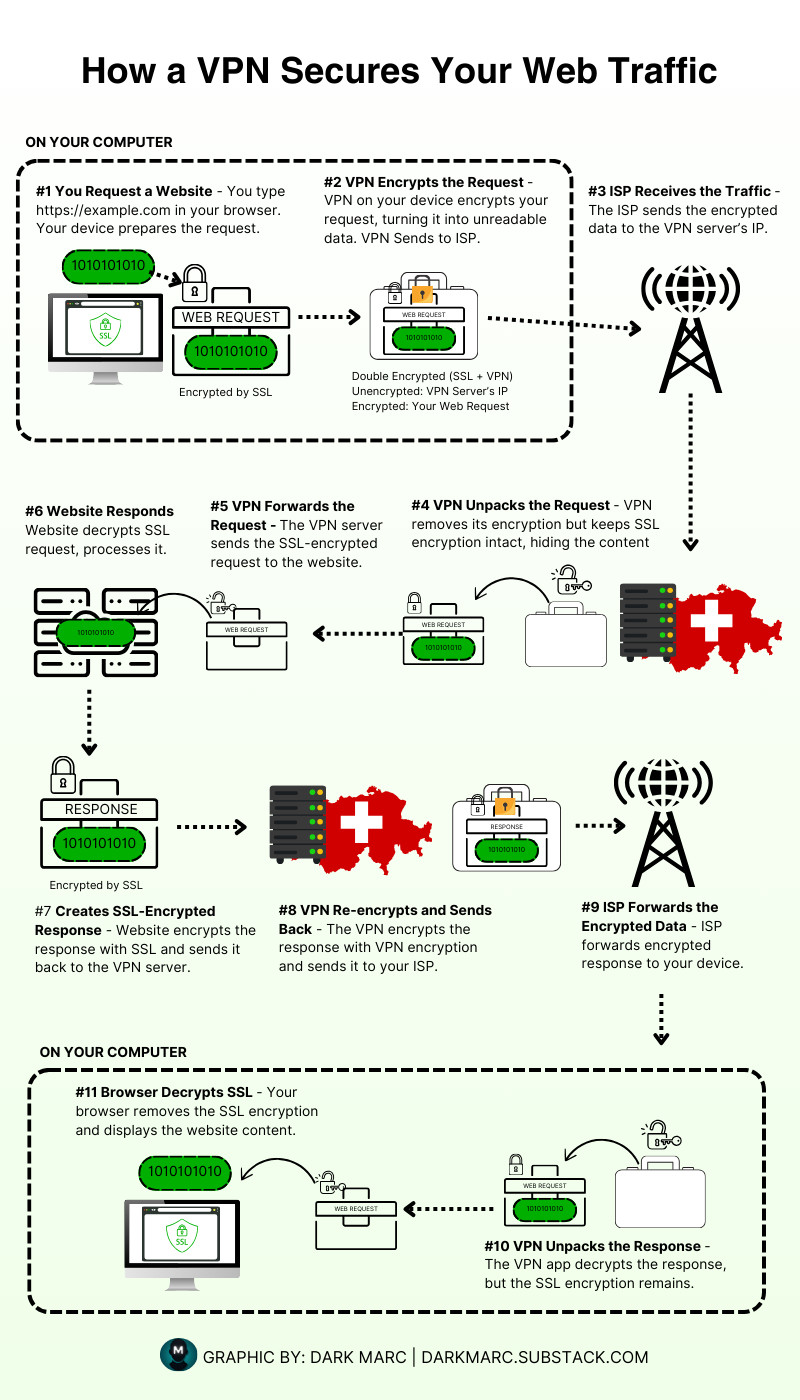
Everyone whips out their VPN when they hop on public Wi-Fi. And yeah, that’s good. It encrypts your traffic, making it harder for someone snooping on the network to see what you’re doing. But let’s get real: a basic VPN is like putting a screen door on a bank vault. It helps, but it’s far from foolproof protection against determined adversaries. Especially now.
Beyond Encryption: VPN Features That Matter
What you really need is a VPN provider that goes the extra mile. Think no-log policies – they literally don’t record your activity. Look for strong kill switches that instantly cut your internet if the VPN connection drops, preventing leaks. Features like obfuscated servers can help disguise your VPN traffic if your network tries to block it. And always, always opt for providers that use modern, secure protocols like WireGuard, not outdated PPTP.
When Basic VPNs Fail
If you’re doing anything sensitive – accessing financial accounts, dealing with confidential work data, or even just wanting genuine privacy – a cheap, free VPN is a terrible idea. Many “free” VPNs make money by selling your data, defeating the whole purpose! Even paid ones can have vulnerabilities or be compelled by governments to hand over data. Understand the limitations. A VPN is a tool, a crucial one for online privacy, but it’s just one piece of a much bigger security puzzle.
Frequently Asked Questions
-
Is 'future-proofing' even possible with cyber threats evolving so fast?
Look, ‘future-proofing’ is a bit of a loaded term. Nobody has a crystal ball. But think of it like building a really strong house. You use solid materials, good design, and keep up with maintenance. You can’t stop every hurricane, but you sure as heck can survive most storms. It’s about building a resilient digital life, not an impenetrable fortress. Focus on fundamentals like strong passwords and vigilance, and you’ll be way ahead of the game.
-
What's the single most important thing I can do RIGHT NOW to protect myself from future threats?
Honestly? Strong, unique passwords for everything, and turn on multi-factor authentication (MFA) wherever possible. I can’t stress this enough. If you’re still using ‘password123’ or reusing the same password across sites, you’re basically leaving your front door wide open. MFA is like adding a deadbolt and an alarm system. It’s a pain sometimes, but it’s the single biggest hurdle you can put between a hacker and your data.
-
How often should I be updating my software and devices?
As often as the little pop-up asks you to! Seriously though, don’t ignore those update notifications. They’re not just aoying nags; they’re patching up known security vulnerabilities that hackers actively exploit. Think of it as patching holes in your digital ship before it sinks. For critical stuff like your operating system and browser, try to update within a day or two of a release. Other apps can be a bit more forgiving, but don’t let them lag for months.
-
Are those VPNs really necessary for everyday internet use?
Necessary? Maybe not for checking cat videos on your home Wi-Fi. But if you ever coect to public Wi-Fi (coffee shops, airports, hotels), then yeah, a good VPN is highly recommended. It encrypts your coection, making it way harder for snoops on the same network to steal your info. It’s also useful if you want to add a layer of privacy from your ISP. Think of it as drawing the curtains on your digital window when you’re out in public.
-
What about the 'Internet of Things' (IoT) devices like smart speakers and cameras? Aren't they huge risks?
They absolutely can be! Those smart gadgets are often built with convenience as the top priority, not security. You need to treat them with suspicion. Change the default passwords immediately, keep their firmware updated if possible, and be mindful of what data they’re collecting. Consider isolating them on a separate guest network if your router supports it. Basically, give your smart home security some serious thought; don’t just plug and play without a second thought.