AR Navigation Apps Altering How We Walk Cities
Forget staring down at your phone like some kind of zombie. There’s a new way to see the world, and it’s happening right in front of your eyes. Augmented reality is no longer just for gamers and sci-fi nerds. It’s fundamentally changing how we explore our own neighborhoods, turning everyday strolls into interactive adventures. We’re talking about AR navigation apps, and they’re quietly but surely altering how we walk through cities.
Source : slate.com
Think about it. Remember fumbling with a map, or that sinking feeling when you realize you’re completely lost? Traditional GPS is okay, sure. It tells you where to go. But it doesn’t tell you how to see. It doesn’t point out the cool stuff or warn you about that dodgy alley. AR changes the game. It overlays digital information onto the real world, making your phone screen a window into something more.
Stepping Into a New Reality
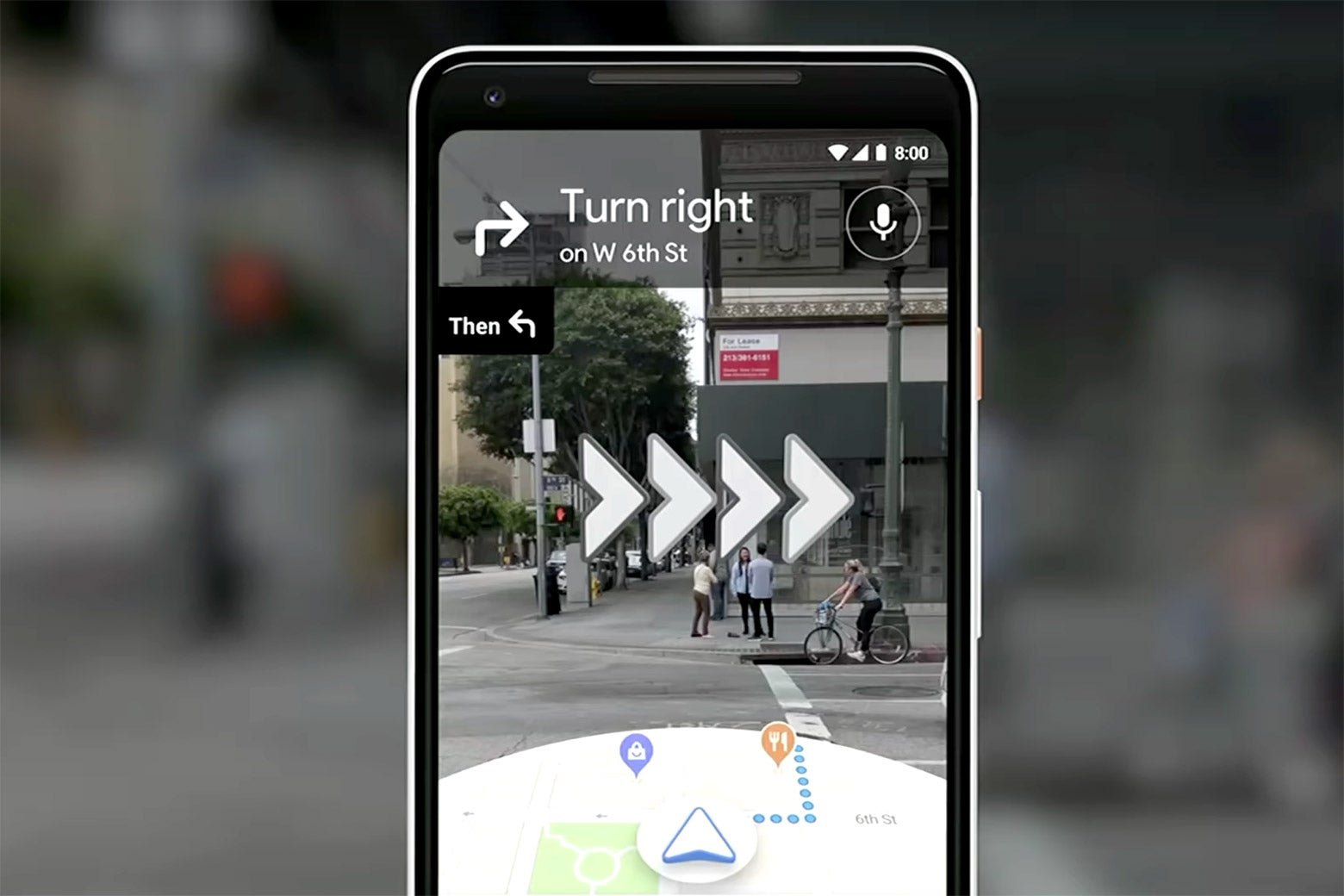
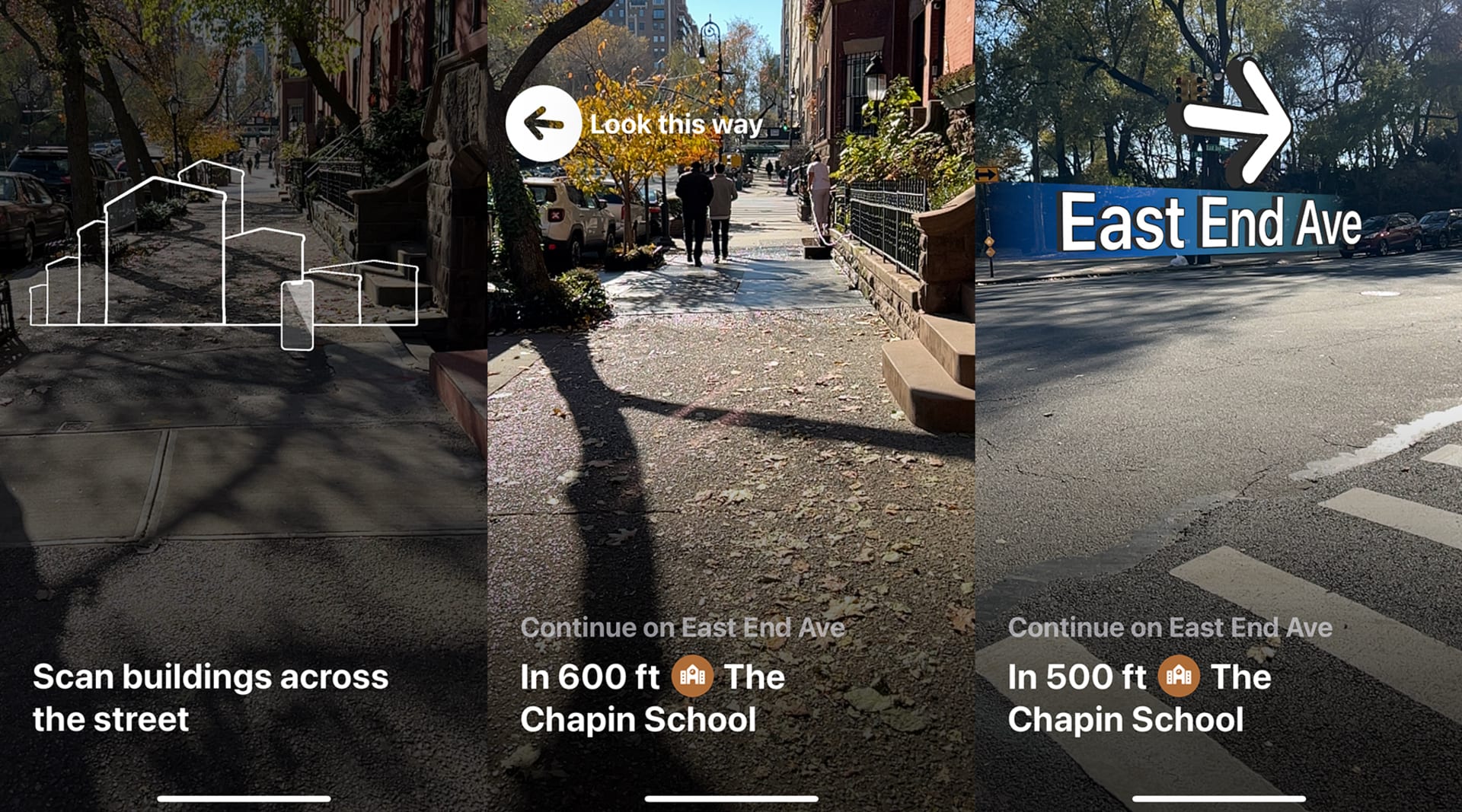
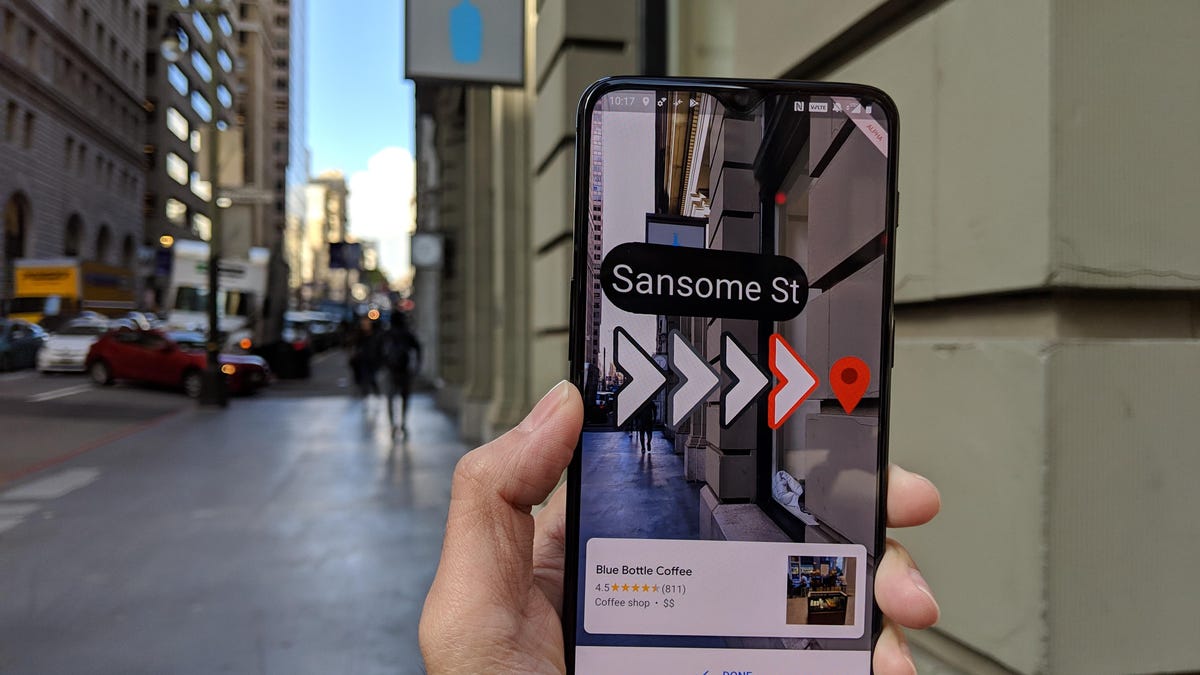
So, what exactly is this AR magic? It’s not just a fancy arrow on a flat map. Imagine walking down a street, and your phone’s camera shows you the actual buildings, the traffic lights, the pedestrians. Now, overlay that with directions. A glowing path appears on the sidewalk in front of you. Arrows hover over street corners. Points of interest pop up as you approach them, complete with reviews or historical facts. It’s like having a super-informed, invisible guide right there with you.
This isn’t some distant future tech. Companies are already building these experiences. They’re using your phone’s camera and GPS to map out a visual overlay. Think about the accuracy needed! It has to be spot-on, or it’s just confusing. The best apps are getting incredibly good at this, blending the digital and physical worlds so smoothly you almost forget you’re looking at a screen.
Why Bother with AR When Maps Exist?
Source : vml.com
Good question. Google Maps, Waze – they’re pretty solid for getting from A to B. But let’s be honest, they’re often a bit… sterile. They tell you to turn left. Then right. They might show you a restaurant icon. But they don’t show you the charming little bookstore tucked away in that alley, or the stuing piece of street art you’d otherwise miss. AR apps add that layer of discovery. They turn a mundane commute into a treasure hunt. This is especially true for pedestrian navigation, where the details matter.
It’s about context. It’s about engagement. Instead of just reaching your destination, you’re experiencing the journey. You might discover a shortcut through a park you never knew existed, or be alerted to a local event happening just around the corner. The real-time information isn’t just traffic jams; it’s the pulse of the city itself.
The Visual Journey: How It Actually Works
Let’s break down the tech sauce. At its core, AR navigation uses a few key components. First, your phone’s camera. It’s constantly scaing your surroundings. Then comes GPS and other sensors (like accelerometers and gyroscopes) to figure out exactly where you are and which way you’re facing. This is crucial. Imagine the app thinking you’re facing north when you’re actually looking east – directions would be useless!
Sophisticated algorithms then piece all this data together. They match what the camera sees with the digital map data. This process, often called Simultaneous Localization and Mapping (SLAM), allows the app to understand its environment and place virtual objects (like arrows or paths) precisely in the real world. It’s complex stuff, but the result? Pure magic for the user. It feels intuitive, almost like an extension of your own senses.
Some apps go even further, using computer vision to recognize landmarks. See that specific building? The app knows it’s the Old Town Hall. It can then use that information to refine your position and provide even more accurate guidance. It’s like the app is learning and seeing the city alongside you.
AR for Tourists vs. Locals
This tech is a massive win for tourists. Suddenly, navigating an unfamiliar city becomes way less intimidating. Instead of deciphering confusing street signs or relying on a printed map that’s probably outdated, you’ve got a digital overlay guiding you. Want to find the nearest gelato shop? See a historical marker? The AR app can point it out. It transforms exploring your neighborhood from a chore into an adventure.
But it’s not just for visitors. Locals can use these apps to rediscover their own cities. You might think you know your area inside out, but AR can reveal hidden gems you’ve walked past a hundred times. Maybe it’s a quirky cafe, a piece of street art, or a scenic viewpoint. The walking with augmented reality aspect makes even the most familiar routes feel fresh.
Think about accessibility, too. For people with certain cognitive challenges or visual impairments, clear, visual cues overlaid directly onto their path could be a game-changer. It’s about making cities more navigable and enjoyable for everyone. It’s a powerful tool for urban exploration.
Source : cnet.com
Examples in the Wild: Apps Making Waves
Okay, enough theory. What apps are actually doing this? Several are popping up, each with its own flavor. Google Maps itself is dabbling in AR with its Live View feature. It’s a good start, showing you arrows and street names overlaid on your camera feed. It’s helpful when you’re really turned around. You can see the street view overlaid with directions.
Then there are more specialized apps. Some focus purely on walking directions, offering a more immersive visual path. Others integrate AR with local guides or historical information, turning a simple walk into an educational tour. Imagine walking through Rome and seeing virtual gladiators in the Colosseum or getting historical context about the Pantheon as you approach it. That’s the power we’re talking about.
Companies are also exploring AR navigation for indoor spaces – think airports or massive shopping malls. Trying to find your gate in a sprawling airport can be a nightmare. AR could provide a simple, visual path right to your door. No more hunting for tiny signs!
The Potential Downsides: Keep Your Head Up!
Now, before we all get lost in a digital wonderland, let’s talk reality. Staring at your phone, even with AR, can still be distracting. We need to be mindful. The whole point is to enhance how we see the real world, not to discoect from it entirely. So, while the tech is cool, situational awareness remains key. You don’t want to walk into traffic because you were too busy admiring a virtual butterfly.
There’s also the battery drain. AR is power-hungry. Ruing your camera and processor constantly will eat through your phone’s battery much faster than traditional GPS. So, make sure you’ve got a power bank if you’re plaing an epic AR adventure.
And let’s not forget data usage. While some apps might cache map data, others will need a constant coection to download overlays and information. This could be an issue if you’re in an area with spotty service or trying to conserve your mobile data. It’s a tradeoff, like anything else. You get the cool visuals, but you might pay for it in battery or data.
The Future is Literally in Sight
Where is all this heading? It’s huge. Imagine AR glasses becoming commonplace. Instead of pulling out your phone, directions and information just appear in your field of vision. You could see reviews for restaurants hover over their doors, or historical facts about buildings as you look at them. This seamless integration is the ultimate goal. It moves beyond the screen and becomes part of how you perceive the world.
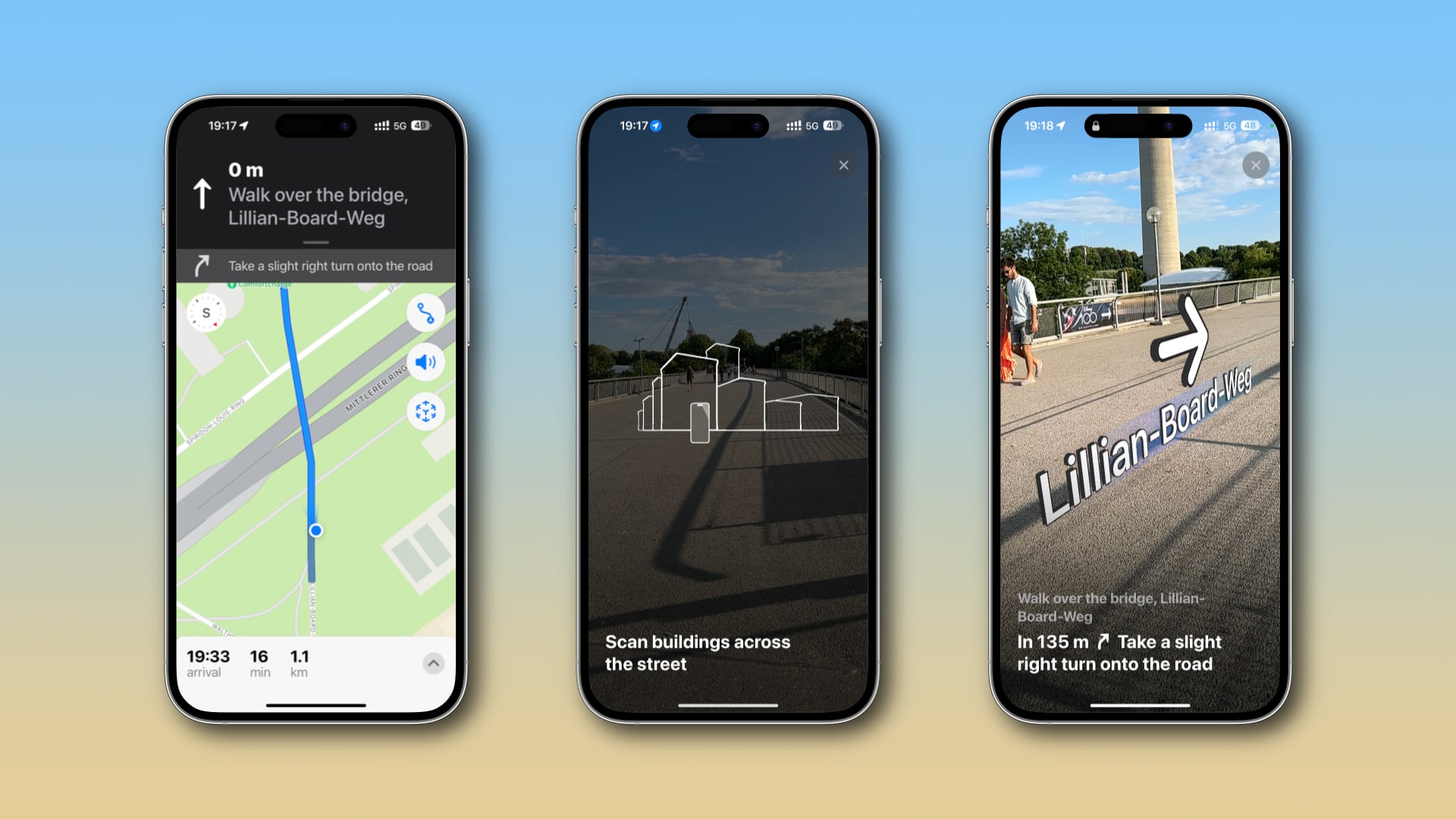
Source : idownloadblog.com
We’re also seeing the rise of AI working hand-in-hand with AR. AI can help personalize the navigation experience, learning your preferences and suggesting routes or points of interest you’d actually like. It’s not just about getting there; it’s about getting there in a way that’s meaningful to you. AI can help predict your route needs.
The development of smart city infrastructure will also play a massive role. As cities become ‘smarter,’ with more coected sensors and data, AR navigation can tap into that information to provide even richer, more dynamic experiences. Think real-time public transport updates appearing as you walk towards a bus stop, or alerts about road closures integrated directly into your visual path.
Will AR Replace Traditional Maps?
Probably not entirely. Traditional maps and GPS have their place. They’re reliable, they don’t drain your battery as quickly, and sometimes you just need a simple, no-frills direction. But AR navigation offers something fundamentally different: an immersive, contextual, and discovery-driven way to experience the world around you. It adds a layer of engagement that flat maps simply can’t match. It’s the next evolution, not a complete replacement. Think of it as a powerful upgrade.
It’s about enhancing the journey, not just the destination. For anyone who loves to explore, who enjoys the serendipity of discovery, AR navigation apps are a thrilling prospect. They’re changing the way we see our cities, one visual overlay at a time. So next time you’re out for a walk, don’t just look down at your phone. Look through it. You might be surprised what you discover.
Frequently Asked Questions
What is the best navigation app for cities?
Honestly? It depends on what you need. For general driving and quick directions, Google Maps is still a powerhouse. Waze is great for real-time traffic and police alerts, but it’s less ideal for walking. If you’re all about that immersive, visual experience while walking, you’ll want to look at apps that offer augmented reality features. Keep an eye on Google Maps’ Live View and explore newer, specialized AR navigation apps as they emerge. The ‘best’ is really about the ‘best for your specific trip’ – driving, walking, exploring!
Is there a better app than Google Maps for walking?
For pure walking, some people find dedicated walking navigation apps more intuitive than Google Maps. While Google Maps is adding more AR features like Live View, which is pretty cool, other apps might offer a more focused or visually engaging experience. Think about what you want: Just directions? Or do you want discovery features, historical tidbits, or gamified elements? If it’s the latter, exploring apps with strong AR walking capabilities could definitely be an upgrade. Google Maps is solid, but ‘better’ is subjective here!
Is Waze better than Google Maps for walking?
Short answer? No. Waze is built primarily for drivers. Its strength lies in its crowdsourced real-time traffic data, speed trap alerts, and hazard warnings – all super useful when you’re in a car. But for walking, Waze’s interface and features just aren’t optimized. It doesn’t offer the pedestrian-friendly views or AR overlays that Google Maps is starting to incorporate. Stick with Google Maps or a dedicated walking/AR app when you’re on foot. Waze is for the road warriors.
What are the biggest challenges for AR navigation adoption?
The biggest hurdles are probably threefold: battery life, accuracy, and user comfort. AR is a major power hog. Plus, if the virtual directions aren’t perfectly aligned with the real world – like if that arrow is a few feet off – it can cause confusion or even danger. People also need to feel comfortable using it without constantly being distracted from their surroundings. Getting the tech just right is key.
How can AR navigation improve public transport?
Imagine standing at a bus stop. Instead of squinting at a schedule, your AR app could show you exactly when the next bus is arriving, where it is on its route, and even display the bus number and destination floating in the air as it approaches. It can make navigating complex transit hubs, like large train stations or airports, much simpler by overlaying clear, visual paths to your platform or gate. It really bridges the gap between plaing your trip and experiencing it.