Smart Home Security & Data Privacy 2026: What You Need to Know
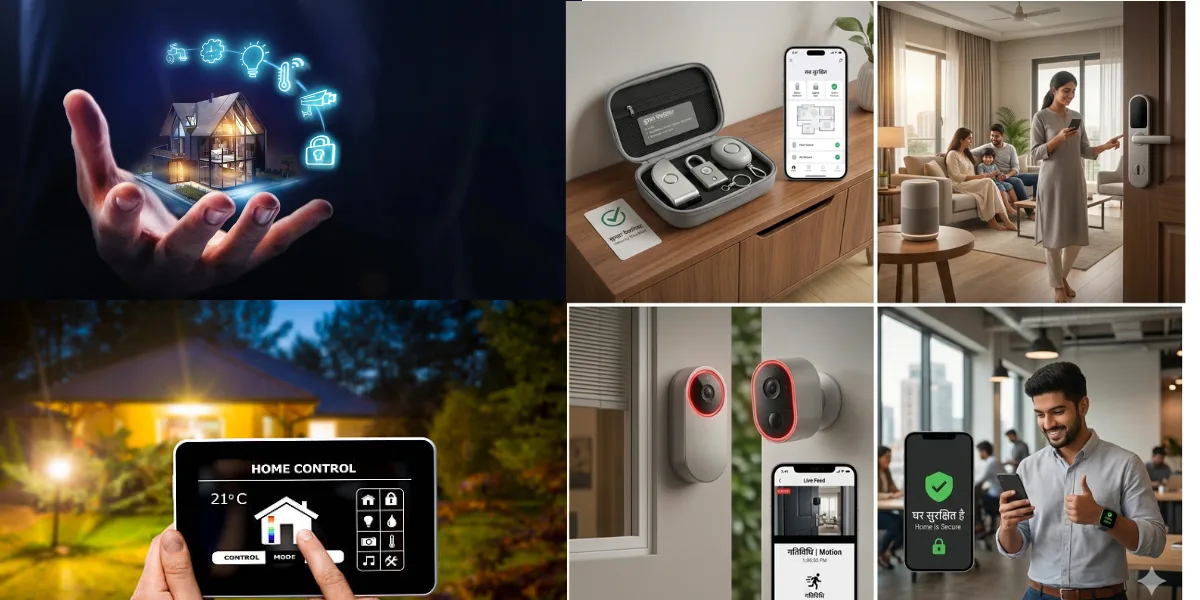
Look, we all want that slick, futuristic home. Lights turn on when you walk in, the thermostat knows you’re coming, and your doors lock themselves. It’s pretty darn cool. But let’s be real for a second. While we’re busy marveling at the magic of smart home tech, we’re also handing over a ton of personal data. And in 2026, that’s becoming a HUGE problem. It’s not just about keeping the bad guys out; it’s about who’s really watching your every move inside your own four walls. Let’s dig into this.
Source : studio79hardware.com
The Rise of the Connected Home (And Its Dark Side)
Remember when a smart thermostat was cutting-edge? Now? It’s practically standard. We’ve got smart speakers listening, smart cameras watching, even smart refrigerators telling us when we’re out of milk. It’s a convenience revolution, no doubt about it. Think about it: you’re out, and you can check on your pets, adjust the temperature, or even see who’s at the door, all from your phone. Wild, right?
But this convenience comes at a cost. Every single device connected to your home network is a potential entry point. Not just for hackers, but for the companies that made the gadgets. They’re collecting data. Lots of it. About your habits, your schedule, who visits, what you watch, what you say. It’s a goldmine for them, and sometimes, frankly, it’s a bit creepy.
The year 2026 isn’t some far-off sci-fi future; it’s here. And the way we handle smart home data is catching up fast. We’re drowning in devices, and the privacy policies? They’re often long, dense, and frankly, nobody reads them. That’s why understanding the risks and taking control is absolutely critical. It’s time we got serious about securing your data.
Your Smart Home: A Data Privacy Minefield
Honestly, it’s scary how much information these devices can gather. Your smart speaker? It hears more than just “play my favorite song.” It hears your conversations. Your smart TV? It knows what you watch, when you watch it, and probably judges your binge-watching habits. Even your smart lock logs who comes and goes, and when.
And where does all this data go? It’s often sent to company servers, sometimes overseas. While they promise it’s for “improving your experience,” it’s also used for targeted advertising, building user profiles, and who knows what else. Think of it like this: you invite a guest into your home. Now imagine that guest takes detailed notes on everything you do, every conversation you have, and sells those notes to the highest bidder. Not cool, right?
The scary part? Data breaches happen. Companies get hacked. Suddenly, your intimate home data is out there. And unlike a stolen credit card number, you can’t easily change the fact that your security camera saw you in your pajamas. We need to start treating our smart homes less like a tech demo and more like the sanctuary they’re supposed to be. This is why keeping up with smart home security is more important than ever.
Must-Have Smart Home Security Gadgets for 2026
Okay, so we know it’s a bit of a mess. But that doesn’t mean you have to go back to a flip phone and a deadbolt. There are some smart ways to beef up your home security system without sacrificing all your privacy. It’s all about making informed choices and using the right tools.
Secure Your Network First
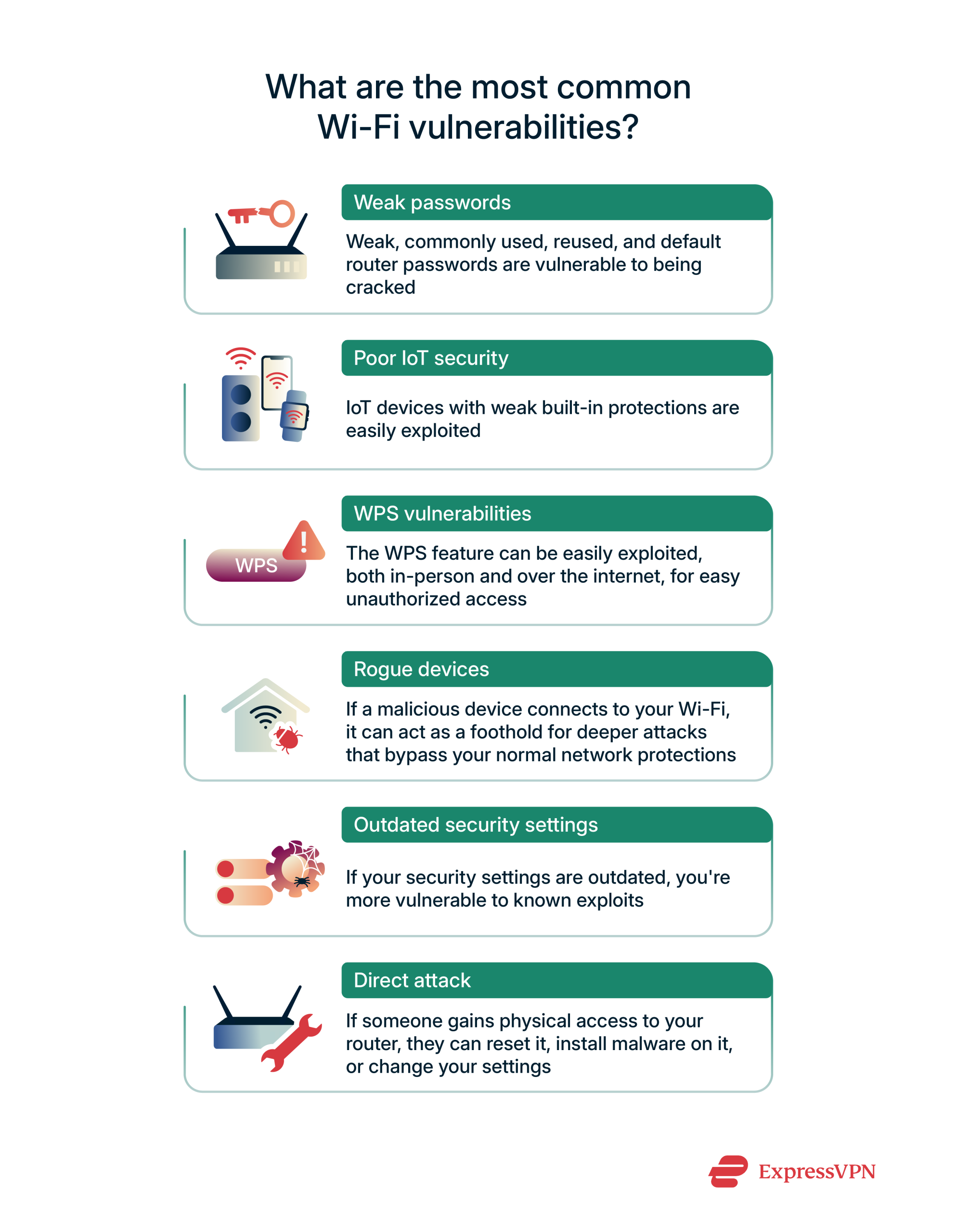
This is non-negotiable. Your Wi-Fi router is the front door to your entire smart home. If that’s weak, everything else is vulnerable. Use a strong, unique password. Enable WPA3 encryption if your router supports it. And for crying out loud, change the default administrator password!
Smart Locks with a Brain
Forget basic keypads. Look for smart locks that offer robust encryption, multi-factor authentication (like fingerprint or app confirmation), and a clear audit trail of who unlocked the door and when. Some even let you grant temporary access to visitors, which is super handy. Just make sure the company has a decent track record with data protection.
Eye-Spy Cameras (The Good Kind)
When choosing security cameras, prioritize local storage options (like an SD card) if possible, or at least reputable cloud services with strong encryption. Look for features like end-to-end encryption. Also, position your cameras wisely – not staring into your bedroom, unless that’s really your thing (no judgment!). Check out the latest on smart camera privacy.
Intruder Alerts That Actually Work
Smart doorbells and motion sensors are great. But make sure they’re reliable and offer customizable alerts. You don’t want your phone buzzing every time a leaf blows by. Integration with other security devices is a big plus, creating a more cohesive defense. Plus, a good smart doorbell can deter porch pirates.
The Mighty Smart Hub
If you’ve got a bunch of different smart devices, a central hub can sometimes simplify management and security. Look for hubs that prioritize local control over cloud-based processing. This keeps more of your data within your own network. It’s one step towards taking back control of your digital life. And hey, it makes managing your smart home ecosystem way easier.
This is just the tip of the iceberg, folks. The world of smart home security and data privacy is complex. But understanding these basic steps is a massive leap forward. It’s about enjoying the future without living in a fishbowl. For more on how companies are approaching this, take a look at this overview on smart home privacy.
Settings to Stop Your Smart Home Devices from Spying

Source : nerdalert.com
Disable Unused Features
Seriously, who needs their smart toaster listening in? Go through every single device. Find the settings menu. Turn off anything you’re not actively using. Microphones? Cameras? Location services? If it’s not essential for the core function, shut it down. It’s like closing doors you don’t use to keep the drafts out. Simple, effective.
Control Data Sharing Permissions
These companies love to collect data. It’s their business model. For your smart speaker, your thermostat, even your damn smart fridge, dig into the app permissions. What data is it allowed to share? With whom? Be ruthless. Revoke access wherever possible. You’re not running a data farm for Silicon Valley; you’re just trying to turn on your lights with your voice. Keep it that way. Limit third-party access.
Regularly Review Connected Apps
You probably linked your smart home app to something else ages ago. Maybe a fancy dashboard? Or a vacation home monitoring service? Go back and look. Are you still using it? Does it really need access to your home’s security feed? If not, rip that connection out. It’s a potential backdoor you’re not even thinking about. Out of sight, out of mind doesn’t work here.
Understand Default Settings
Out of the box, many smart devices are set up for maximum data collection, not maximum privacy. It’s a known thing. So, before you even connect that new smart camera, check the manual or their website for default privacy settings. Then, immediately change them. Don’t assume ‘safe’ is the default. It rarely is. You have to actively make it safe.
The Rise of Decentralized Smart Home Hubs
Source : market.us
What’s a Decentralized Hub, Anyway?
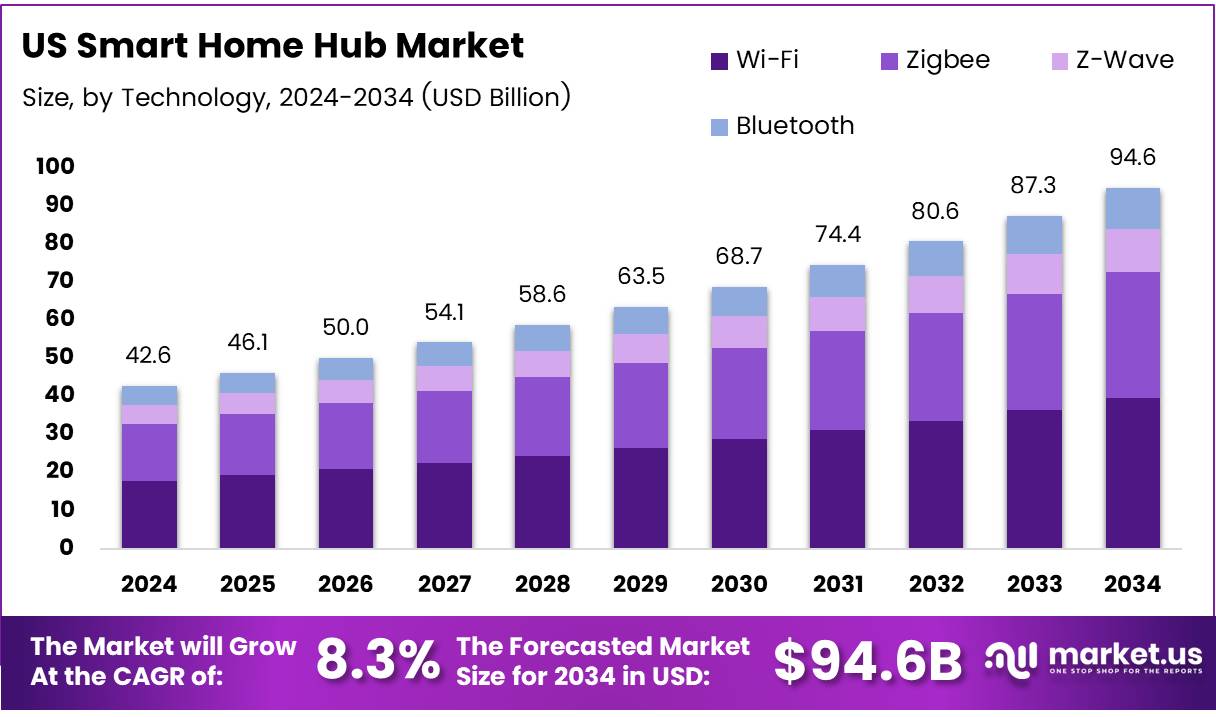
Forget the big tech giants controlling everything. The future? It’s about decentralized smart home hubs. Think of it like this: instead of all your data going to Google or Amazon’s massive servers, it stays more local. Or it’s managed through peer-to-peer networks. Less central point of failure, less single entity with all your info. It’s a big shift, and it’s coming fast.
Privacy Benefits of Local Control
This is the big draw. With a decentralized setup, your commands and data often stay within your home network. Your voice command to turn on the lights? It might be processed right there on the hub, not sent off to the cloud. This means significantly less data floating around the internet, waiting to be breached or analyzed. It’s a huge win for privacy-conscious folks.
Interoperability Challenges and Solutions
Sure, it sounds great. But the reality? It’s still messy. Getting devices from different brands to play nice with a non-centralized hub can be a headache. That’s where standards like Matter are trying to step in. They’re the translators, making sure your Philips Hue bulbs can talk to your new, privacy-focused hub. It’s a work in progress, but essential for adoption. Device compatibility is key.
Examples of Emerging Decentralized Tech
We’re seeing open-source projects gaining traction. Think Home Assistant running on your own hardware, or new hardware hubs built from the ground up with privacy as the main goal. Companies are starting to explore solutions that don’t rely solely on cloud processing. Keep an eye on this space. It’s where the next wave of innovation is happening, all driven by privacy concerns.
How to Audit Your Wi-Fi Network for Hidden Vulnerabilities
Source : expressvpn.com
Run a Network Scan
First things first, you need to know what’s on your network. Grab a tool – there are plenty of free and paid ones like Fing or even Nmap if you’re techy. Run a scan. It’ll show you every single device connected. You might be surprised what pops up. That old tablet you forgot about? Is your neighbor’s printer somehow on there? Scan your network regularly.
Check Your Router Settings
Your router is the gatekeeper. Log into its admin panel. Seriously. Don’t just set it and forget it. Change the default password (duh). Turn off WPS if you don’t need it. Enable WPA3 encryption if your router supports it – it’s much stronger than WPA2. Look for any strange connected devices you don’t recognize. Also, make sure your router’s firmware is up to date. Outdated firmware is like leaving the front door unlocked.
Secure Your Guest Network
Got a guest network? Good. But is it actually secure? Make sure it has a strong, unique password and that it’s completely isolated from your main network. You don’t want Aunt Carol’s laptop, riddled with malware, getting access to your smart fridge. Guest networks are for guests, not for giving intruders a shortcut. Isolate guest traffic.
Monitor Network Traffic (Advanced)
This is where you get really serious. Tools like Wireshark can let you see the actual data packets flowing through your network. It’s complex, yeah, but you can spot unusual activity. Devices talking to servers they shouldn’t be? Unexpected large data transfers? It’s a bit like hiring a private investigator for your internet. Requires some know-how, but offers unparalleled insight.
Fingerprint vs Retina Scanners for Smart Locks
Source : butterflymx.com
Fingerprint: The Ubiquitous Choice
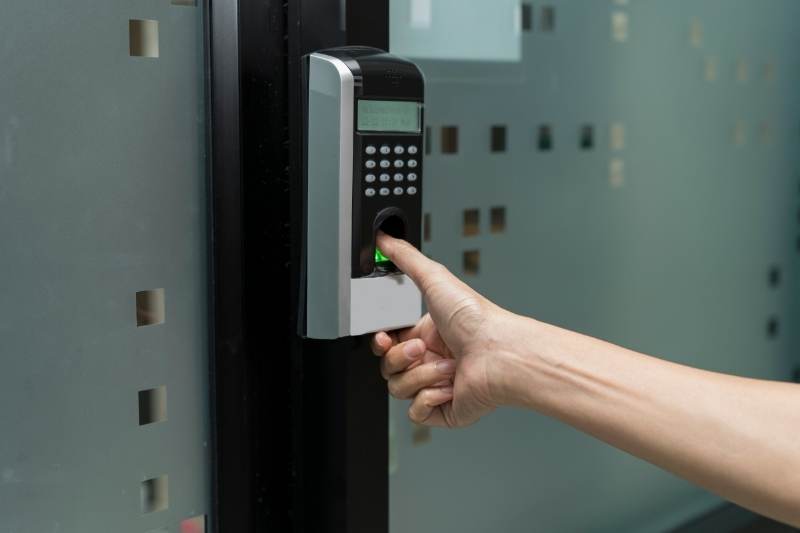
Fingerprint scanners on smart locks are everywhere. They’re convenient, quick, and most people have them. You just… touch it. Easy. The tech has gotten pretty good, too. Most modern ones can handle sweaty fingers or minor cuts. It’s the most common biometric for a reason. Plus, you don’t need to remember a code. Just present your digit.
Security Considerations for Fingerprints
The downside? They’re not foolproof. High-quality fakes can sometimes fool cheaper scanners. And if someone gets a really good, clear print of your finger (maybe from a glass?), there’s a possibility they could replicate it. It’s a low-probability risk, but it exists. Also, what happens if your finger is injured? Locked out.
Retina Scanners: The High-Security Frontier
Retina scanners? Now we’re talking serious sci-fi security. They read the unique pattern of blood vessels in your eye. It’s incredibly accurate. Far more secure than fingerprints. The chances of someone replicating your retina pattern are astronomically low. This is the kind of tech you see in spy movies for a reason. Top-tier security, for sure.
Practicality and Cost of Retina Scanners
But here’s the catch: they’re expensive. Like, really expensive. And the technology isn’t really geared towards the average consumer smart lock yet. You’d have to awkwardly hold your eye up to the lock. Not exactly convenient for a quick entry after a long day. It’s overkill for most homes right now, but the future of access control might head this way.
Which is Right for Your Home?
For most of us, a good quality fingerprint smart lock offers the best balance of convenience, security, and cost. If you live in a high-security building or have specific concerns, maybe you’d look into more advanced options. But for general home use? Fingerprint is the way to go. It’s proven, it’s accessible, and it works. Don’t overthink it unless you absolutely have to.
Data Privacy Day Reclaiming Your Digital Footprint
Source : bitdefender.com
Audit Your Online Presence
Seriously, take an hour. Google yourself. See what pops up. Old social media profiles? Forum posts from college? Public records? You might be surprised what’s out there. This is your digital footprint. Start by listing out all the accounts you can remember. Emails, social media, shopping sites, everything. You need to know what you’ve put out there.
Delete Old, Unused Accounts
Found an old MySpace profile? Or a GeoCities page? Just kidding. But seriously, if you find accounts you haven’t used in years, delete them. Most services have an account deletion process. It might be buried deep, but it’s usually there. Every account you close is one less place your data can be compromised. It’s digital decluttering, pure and simple. Less is more.
A Sample Data Audit Table
Here’s a simple way to track what you find and what you do about it. It helps keep things organized when you’re dealing with dozens of sites.
| Website/Service | Account Exists? | Last Used (Approx.) | Data Shared? | Action Taken | Date Actioned |
|---|---|---|---|---|---|
| Yes | 2023 | Yes (Profile, Posts) | Deactivate Account | Jan 28, 2026 | |
| Old Email Provider | Yes | 2015 | Yes (Personal Info) | Delete Account | Jan 28, 2026 |
| Online Retailer X | Yes | 2022 | Yes (Purchase History) | Delete Account | Jan 29, 2026 |
| Smart Home App Y | Yes | Current | Yes (Device Usage) | Review Permissions | Jan 29, 2026 |
Manage Your Privacy Settings Across Platforms
For the accounts you do keep, dive into the privacy settings. Social media sites are notorious for having complex settings. Turn off location tagging, limit who can see your posts, review app permissions. Be proactive. Don’t wait for a data breach to think about your online privacy. It’s an ongoing task, not a one-time fix.
Be Mindful of New Data Sharing
Every time you sign up for a new service, use a new app, or even click ‘agree’ on a website update, you’re potentially sharing more data. Read the terms of service (yeah, I know, nobody does). At least skim the privacy policy. Understand what you’re agreeing to. Is that free game really worth giving them access to your contacts? Think before you click.
Frequently Asked Questions
-
What is the home automation trend in 2026?
Look, home automation in 2026 is all about integration, and frankly, making your life easier. Forget those clunky single-purpose gadgets. We’re talking about smart homes that actually talk to each other. Your thermostat syncs with your blinds, which talk to your security system when you leave. It’s becoming less about novelty and more about a truly coected living experience. Think AI-powered routines that predict what you need before you do. It’s getting pretty wild, but also incredibly convenient.
-
What is the future of smart home security?
The future of smart home security is a double-edged sword. On one hand, you’ve got AI constantly learning and adapting to threats, offering proactive threat detection that’s light years ahead of yesterday’s basic alarms. We’re seeing more sophisticated facial recognition and even behavioral analysis to spot anomalies. But the flip side? That data has to go somewhere. Ensuring your data stays private while these systems get smarter is the biggest ongoing battle. Encryption and decentralized storage are becoming way more important.
-
What are the information security trends in 2026?
Information security in 2026 is getting serious. Forget playing catch-up. The big trend is zero-trust architecture – assuming nothing is safe and verifying everything, always. AI is a huge player here too, not just for defense but also for the attacks themselves, so security has to be equally smart. Plus, with the rise of IoT devices, the attack surface is massive. Companies are really pushing for better endpoint security and regular vulnerability assessments. It’s a constant arms race, really.
-
Are people going back to old technology in 2026?
Going back to old tech? Not really. It’s more about finding a balance. People aren’t ditching their smart devices, but they are getting smarter about which devices they bring into their homes and how they use them. Think of it as conscious tech adoption. If a smart lock doesn’t offer a clear benefit over a good old-fashioned deadbolt and you can’t verify its privacy policy, why bother? We’re seeing a push for simpler, more secure options when the ‘smart’ features don’t add real value or introduce uecessary risk. It’s about security over convenience sometimes.
-
How can I secure my smart home network?
Securing your smart home network is absolutely crucial. First off, change those default passwords! Seriously, everyone still uses ‘admin123’. Use strong, unique passwords for every device and your Wi-Fi. Enable two-factor authentication wherever possible – it’s a lifesaver. Consider setting up a separate network (a guest network, for instance) just for your IoT devices so they’re isolated from your main computers and phones. And keep your router firmware updated; those updates often patch serious security holes. It sounds like a lot, but honestly, it’s about basic digital hygiene.